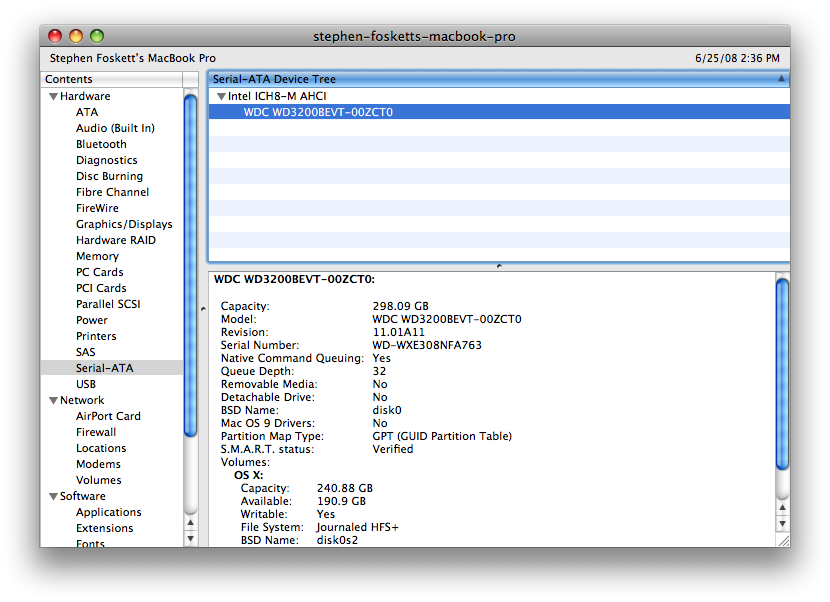
 I know I’m not the first to do this, but it does make me chuckle to have upgraded a brand new machine less than a week after buying it. That’s right, my brand new MacBook Pro now has 4 GB of RAM and a massive 320 GB of disk space. If you’re thinking of upgrading your disk, whether you have a Mac or PC, now might be a good time, as prices have recently hit a new low point.
Update: My MacBook Pro is now rocking a Toshiba 640 GB hard disk drive!
Read on for details on swapping a disk in a MacBook Pro, finding a great deal on the drive, and how to get Boot Camp and VMware Fusion to work again after you do it! Surprisingly, this was the hardest part…
Now for some particulars and lessons learned:
- The MacBook Pro is not an easy machine to install hardware in! Although the RAM is readily accessible, all other components are sealed inside that sleek silver case, and it was not meant to be opened. It is certainly doable for most people, provided they have the right tools, but closing it back up again is tricky! There are 19 screws, both Phillips #0 and Torx T6, and the correct screwdriver is a must-have. Apple must use some serious gorilla snot on the LED/IR cable to attach it to the drive inside, as it took much fussing to cleanly remove it. And getting the front tabs “clicked” took some fussing and more pressure than I wanted to exert!
 I chose a Verbatim SmartDisk 320 GB FireWire/USB Portable hard drive as a donor. It contains a very nice Western Digital Scorpio Blue WD3200BEVT drive that should be compatible with most mainstream notebooks since it’s just 9.5 mm tall. This is a modern unit with two 160 GB platters, 3.0 Gb/s “SATA II” interface with native command queueing, and is fast and quiet.
- Why buy an portable drive instead of a bare hard disk? Because Best Buy had the Verbatim on sale at $129, while the bare drive itself (sitting just down the aisle) was marked $179, that’s why! Plus, the case can be re-used (see below).
- My MacBook had a 120 GB Fujitsu MH2120BH drive, which is a 2-platter 1.5 Gb/s SATA unit with modern perpendicular recording technology. It fit nicely in the leftover Verbatim external drive case! Sadly the case is flimsy compared to the very nice metal Maxtor OneTouch 4 Mini I use on the PC side. But at least the FireWire interface is fast.
- I used SuperDuper to clone the Mac’s internal drive and then booted with the FireWire drive just to make sure it worked. Very nice! Then I cracked the MacBook and swapped the drives.
You might also be interested in my post on upgrading the hard disk drive in a new Mac Mini!
Some notes in particular for folks like me who Boot Camp and VMware Fusion and upgrade their drives:
- I chose Winclone (an OS X app) to back up the Boot Camp partition prior to the drive swap. Worked like a charm, creating a 22 GB image of my 55 GB partition.
- To keep everything “native”, you must use Boot Camp Assistant to repartition the new drive after the upgrade. But Assistant requires you to use GPT to partition the drive, and Verbatim shipped it with APM, so I had to repartition it in Disk Utility before using it.
- I wanted to have two partitions – one for OS X and another for my Home directory. This is standard storage industry best practice and what I do on my Windows machines. But Boot Camp Assistant can’t handle this, and OS X doesn’t make it easy either. So it’s all one partition now. Boo!
- The new Boot Camp partition has to be as large or larger than the old one for Winclone to restore to it. I wasn’t using all my space and wanted to reduce it but couldn’t. So even though I “only” have 22 GB of data in my Boot Camp partition, I had to devote 56 GB to it. I’ll resize it later if I can. Either way, I’ve still got over 200 GB free in my OS X partition! Update: A utility called Camp Tune claims to allow you to resize your Boot Camp partition. I’ll test it and report back!
- VMware Fusion works great with Boot Camp partitions normally, but falls on its face when you replace the drive like I did. Fusion kept trying to use an invalid configuration for the new Boot Camp partition, and there is no easy way to make it work again after you’ve changed it. But I found the answer – you have to delete /Users//Library/Application Support/VMware Fusion/Virtual Machines/Boot Camp, reboot into Boot Camp, and restart OS X before Fusion will correctly detect and configure the partition! This is crazy stuff, but it works now!
All in all, I’m really enjoying the Mac. Many OS X features are great (though some are lousy) and the hardware is superb. But it is the ability to run Windows, both natively and using Fusion, that really seals the deal for me. This really is the ultimate laptop, with a nice desktop UNIX, serious Windows performance, and now as much RAM and disk as anyone is likely to need. At least until the 500 GB drives arrive next month…
Greg Ferro just did exactly the same thing, and I got a kick out of the name of his post!

I just just upgraded the hard drive on my late 2008 macbook (I find 72k drives improve speed substantially w/ Fusion, even w/ the bootcamp partition) using your suggestions on winclone and fixing the bootcamp partition w/ Fusion. This saved me lots of time over upgrading the drive on my previous macbook. Thanks for the help, Stephen!!
I just just upgraded the hard drive on my late 2008 macbook (I find 72k drives improve speed substantially w/ Fusion, even w/ the bootcamp partition) using your suggestions on winclone and fixing the bootcamp partition w/ Fusion. This saved me lots of time over upgrading the drive on my previous macbook. Thanks for the help, Stephen!!
I cannot believe I never thought of this. I have almost the exact same macbook pro as you, and i DO have the exact same external drive. I’m so doing this right now. Kudos.
I cannot believe I never thought of this. I have almost the exact same macbook pro as you, and i DO have the exact same external drive. I'm so doing this right now. Kudos.