It may seem odd to buy a computer intending to upgrade it right out of the box, but so it was with me when I snapped up a new 2009 Nvidia-powered Mac Mini. I had been waiting for Apple to update the aged Mini line, saving up my pennies, but the out-of-box specs for RAM and hard drive space were underwhelming.
Out-Of-Box Upgrade
Unlike the old Mini, where the $799 model netted a SuperDrive as well as additional memory and disk, the new Mini’s $200 upmarket model was seriously overpriced. So I decided to pick up a base model and upgrade it myself right away.
Now that my upgrade is complete, I’m pleased to say that my Mac Mini is a whole new animal! Where the spec base Mini was sluggish, exhausting its meager 1 GB of RAM and swapping to a crazy slow hard drive, my Mini is now snappy and quick. Launching iTunes (with 13,000 songs) took upwards of 30 seconds before, but the song list is now visible before the dock icon bounces twice!
Desktop computer performance is a product of four variables:
- CPU speed
- RAM capacity
- Hard drive performance
- Graphics capabilities
Other things matter a great deal, but only these four can be changed in a given system. In other words, although the chipset, memory speed, and system bus all have a massive impact on overall performance, you can’t swap these things out! The majority of computers are limited to upgrades in the four areas listed (CPU, RAM, hard drive, graphics), and each must be balanced for satisfying system performance.
Apple designed the Mac Mini as an integrated unit, however, so the graphics and CPU are not upgradable. But these are the system’s strong suits: The Nvidia 9400M chipset gives solid graphics performance, matching or beating the integrated Nvidia 8600M GT graphics in my late-2007 MacBook Pro, and the Intel Core 2 Duo CPU is easily quick enough for general computing tasks. Frustratingly, Apple ships the Mac Mini with inadequate RAM and a very, very slow disk. So upgrading both is a sure-fire way to an excellent system!
Good Memories
Killer Storage
The Nvidia chipset is up to date as far as RAM goes. The Mini uses fast 1,066 MHz DDR3-8500 memory and has two SO-DIMM slots. These chips are still hard to find in stores (Fry’s doesn’t carry them!) but they aren’t expensive. Thankfully, rather than filling up both slots with useless 512 MB parts, Apple uses a single 1 GB SO-DIMM in base Minis. I was lucky enough to find another Mini upgrader on Twitter who sent me his leftover RAM for the cost of shipping after taking his Mac all the way to 4 GB (thanks, Joe!) and I bet that most folks could do the same. Otherwise, Other World Computing sells leftover 1 GB DDR3-8500 SO-DIMMs from aluminum MacBooks and Mac Minis for just $12.95! They also have upgrade instructions.
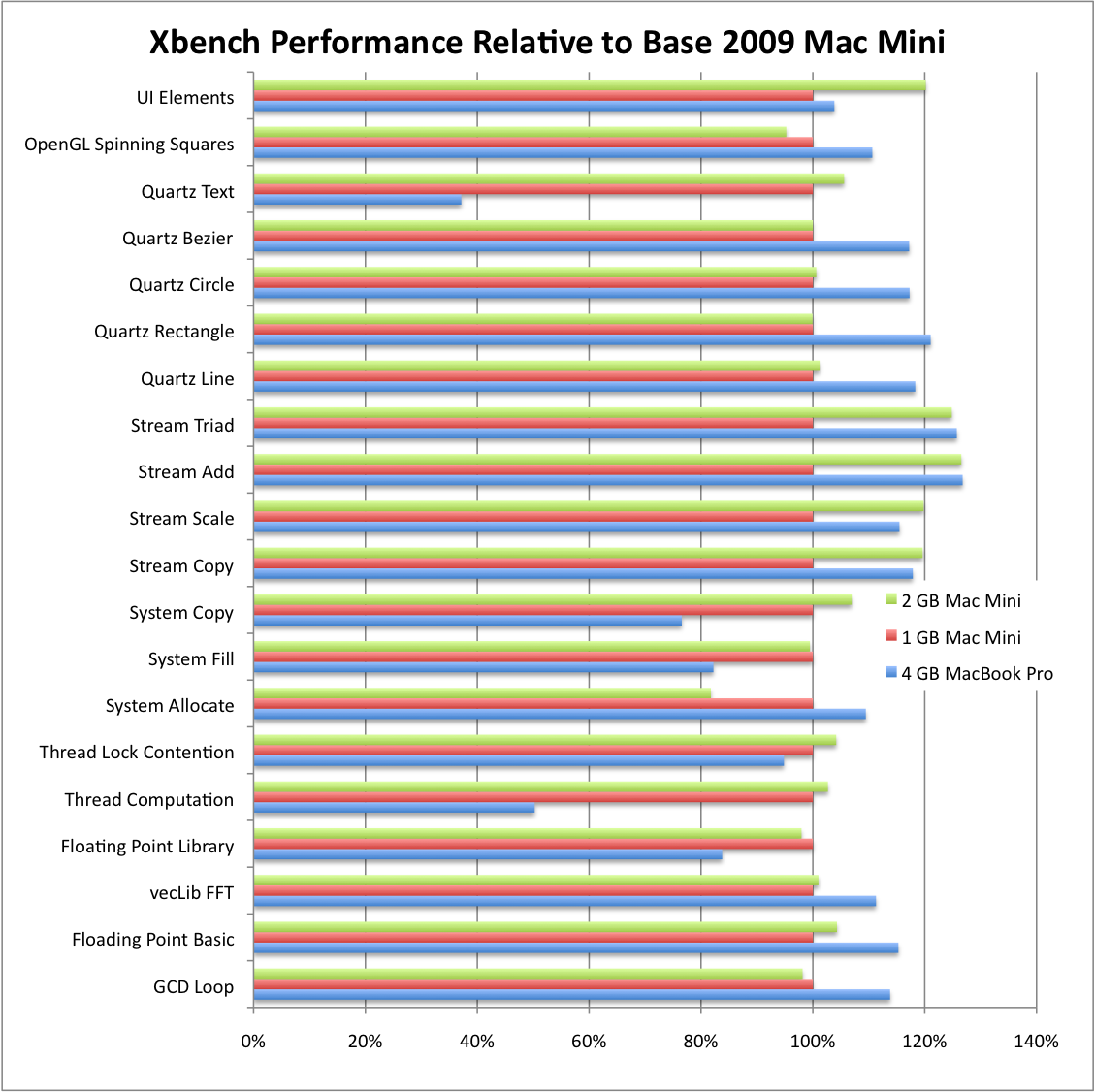
As of Friday, my Mini was rocking 2 GB of RAM, enough for general desktop computing. One side benefit of upgrading was graphics performance: The Mini will use 256 MB of system RAM as a frame buffer if at least 2 GB of RAM is installed, speeding up user interface windowing operations by about 20%, according to Xbench. Overall memory performance also improved with two SO-DIMMs installed, with streaming operations up by 20% to 25%.
Driving It Home
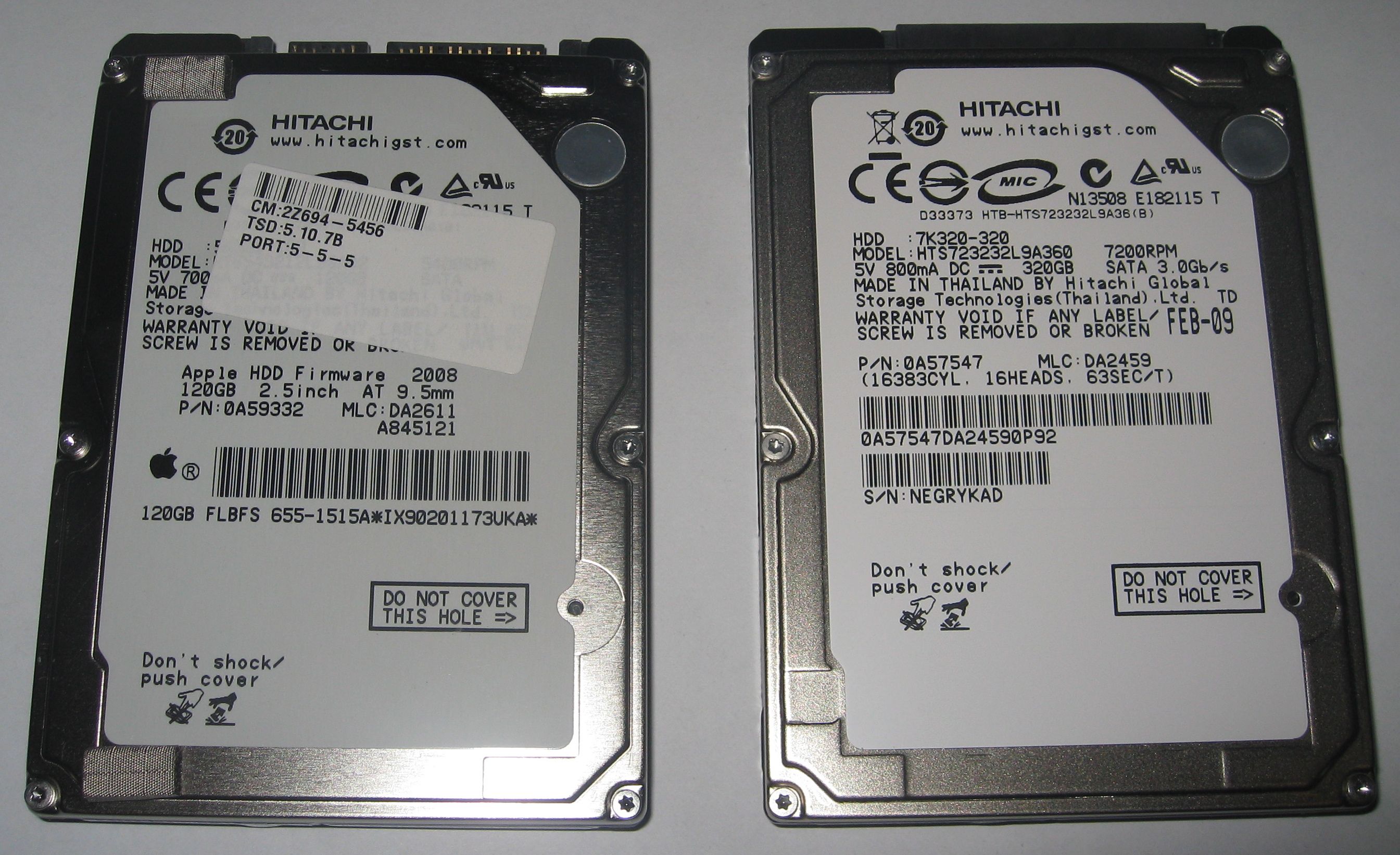
The Mini’s hard drive performance was especially disappointing. The stock 120 GB Hitachi TravelStar 5K320 was a special Apple OEM unit with a single platter and 8 MB of cache. Its slow 1.5 Gb SATA interface wasn’t the bottleneck, though – this drive just poked along, maxing out at about 35 MB/s in sequential operations. This compares favorably to previous-generation drives, but can’t hold a candle to the latest disk drive mechanisms. Apple’s upgrade option for the new Mac Mini is a 320 GB 2-platter version of this same drive. I expect it will perform only slightly better than the 120 GB unit. The stock 320 GB drive seems to perform much, much better than the 120 GB unit in sequential operations!
I decided to upgrade my Mini to a 7200 rpm high-performance drive, and my research led me to Hitachi’s 7k320 series. With just two platters, this 9.5 mm high drive unit remains slim enough for the Mini (or any laptop), and the power specs look great! Hitachi claims only a half-Watt difference between the 7k320 and miserly 5k320 in spin-up and negligible differences in most other operations. Comparison tests showed that the Hitachi was a solid performer against competing offerings from Western Digital, Seagate, and Samsung, and ZipZoomFly listed the 320 GB drive for just $59 after rebate!
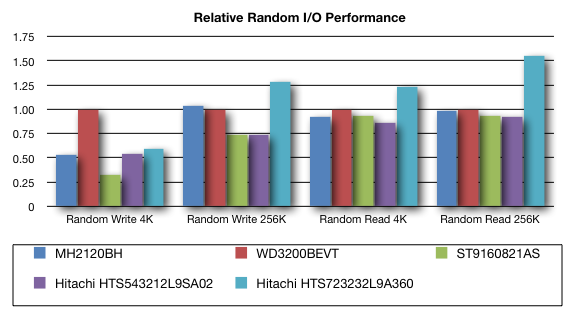
I couldn’t be happier with the 7200 rpm Hitachi drive’s performance. It blows away the stock drive, delivering 32 MB/s in large random write operations, and even beats the solid 5400 rpm Western Digital Scorpio Blue drive I use in my MacBook Pro.
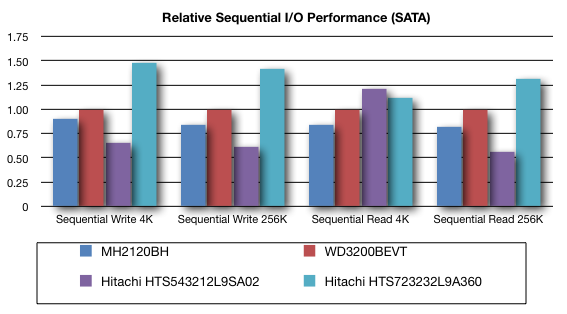
The new Hitachi blows everything else away in sequential operations, too. It delivers a solid 80 MB/s while reading and writing large files while the stock unit could barely reach 35 MB/s! These differences are magnified by the 7k320’s large 16 MB cache, which makes the most of its 3 Gb SATA interface.
Although it doesn’t have to conserve battery power like a laptop, heat is a major concern in a small computer like a Mac Mini, and disk drive power requirements translate directly into heat generation. It turns out that the Mini has such an excellent cooling system that I thought Bjango’s iStat Server was broken: It almost always reported 1,500 rpm fan speed and 120-130° F temperatures. Under sustained load, the Mini’s fan never reached 2,000 rpm and no sensor reported greater than 150° F. The 7200 rpm Hitachi drive has had no impact on in-box temperature or noise levels.
The Mac Mini: Transformed!
Apple delivered a solidly-designed general-purpose desktop computer with the new 2009 Mac Mini, but crippled its performance with too little RAM and a too-slow hard drive. In short, Apple failed to balance the four key pillars of computer performance!
The relatively simple task of upgrading the RAM and hard disk drive transforms the Mac Mini: In normal operations, the upgraded Mini is easily two or three times as responsive as the stock machine! My total cost (for the Mini, the RAM, and the hard drive) was $701. Apple’s $799 2 GB RAM/320 GB disk Mac Mini may look similar on paper, but it won’t touch mine in terms of disk performance. I could have gone all the way to 4 GB of RAM for less than the remaining $98 price difference.
One final word: Apple assured MacWorld that they will continue to honor their warranty on upgraded machines as long as nothing is damaged in the process. The Mac Mini is not that difficult to work on, as long as you have proper tools. Use a static strap, be careful with internal the wires and connectors, and take your time. Once upgraded, the Mac Mini is a satisfying desktop or home server.
Interested in building a home server with Apple’s Mac Mini? Watch my blog over the coming months for detailed reports like this one covering setting up iTunes for whole-house audio, integrating Roku’s SoundBridge music systems, serving video to a TiVo, and configuring Mac OS X as a home server. I’ll also be experimenting with Microsoft’s Windows Home Server and VMware ESX on the new Mini!

Mac Mini as a Windows Home Server
http://www.homeserverhacks.com/2008/06/big-news-from-apples-wwdc-ihomeserver.html
This is a very comprehensive and interesting article. Kudos!
I thought you also might like to see the blog post I did at Other World Computing about upgrading the new (early 2009) Mac mini. We have upgrade videos online that make the upgrade nearly painless. Check it out here please:
http://blog.macsales.com/621-upgrade-your-mac-mini-early-2009
OWC ilene
And that was before they went all-SATA!
Thanks for the upgrade photos and instructions. I added a link to my post.
is there any concern for the extra heat created from 7200rpm?
I was concerned about the heat, but the Mac Mini is keeping nice and cool. Fan remains at 1500 rpm and hard disks remain below 130 F. No problem at all. The 7200 rpm hard drive only draws a half-Watt more than the stock 5400 anyway, and most of the time is just .2 Watts more.
thanks for the reply. I havent tinkered with computers in a while, so i’ve been debating which drive to get .. a seagate momentus, WD scorpio,… but seems like your recomendation of the Hitachi seems solid. I’m going to pick that one up. Thanks Stephen.
I have a 2007 1.8 GHz MacMini Core duo. Can I put Hitachi’s 7k320 series with 320 GB in this desktop? Also, what other improvements can i make to increase its speed and power?
I believe that the Core Duo model uses a SATA drive, and should have the same drive carrier as well. It might not support 3 Gbit and NCQ and all, or it may, but that drive should work well.
These hard drive numbers don’t seem to jive with what I have been seeing. With 2GB 320 mb mini stock I get results that look like this (delivery of true sATA speeds for sequential operations):
Transfer Size Sequential Read Sequential Write Random Read Random Write
4 KBytes 14.698 MB/Sec 9.157 MB/Sec 0.377 MB/Sec 0.865 MB/Sec
8 KBytes 23.873 MB/Sec 16.986 MB/Sec 0.748 MB/Sec 1.744 MB/Sec
16 KBytes 37.400 MB/Sec 29.177 MB/Sec 1.562 MB/Sec 3.385 MB/Sec
32 KBytes 56.732 MB/Sec 44.523 MB/Sec 2.970 MB/Sec 7.651 MB/Sec
64 KBytes 76.462 MB/Sec 61.161 MB/Sec 5.772 MB/Sec 11.410 MB/Sec
128 KBytes 94.160 MB/Sec 75.820 MB/Sec 11.188 MB/Sec 15.979 MB/Sec
256 KBytes 106.498 MB/Sec 85.492 MB/Sec 20.606 MB/Sec 21.502 MB/Sec
512 KBytes 113.120 MB/Sec 91.057 MB/Sec 25.207 MB/Sec 30.110 MB/Sec
1024 KBytes 117.268 MB/Sec 94.176 MB/Sec 40.470 MB/Sec 41.081 MB/Sec
Naturally random operations fall off a bit from sequential because of the slower drive speed, but things are respectable. This is not your daddy’s mac mini.
If I boot to a high speed sATA 7200 rpm drive pushing through the 800 firewire into the new mini, I can improve random operations a bit, but loose the high large end sequential through the firewire connection.
Transfer Size Sequential Read Sequential Write Random Read Random Write
4 KBytes 19.448 MB/Sec 15.375 MB/Sec 0.641 MB/Sec 1.536 MB/Sec
8 KBytes 31.850 MB/Sec 24.716 MB/Sec 1.270 MB/Sec 3.026 MB/Sec
16 KBytes 44.732 MB/Sec 37.841 MB/Sec 2.536 MB/Sec 5.482 MB/Sec
32 KBytes 57.613 MB/Sec 50.294 MB/Sec 4.956 MB/Sec 9.878 MB/Sec
64 KBytes 58.143 MB/Sec 60.504 MB/Sec 9.912 MB/Sec 17.478 MB/Sec
128 KBytes 59.268 MB/Sec 66.900 MB/Sec 18.569 MB/Sec 27.151 MB/Sec
256 KBytes 59.322 MB/Sec 52.951 MB/Sec 28.150 MB/Sec 38.341 MB/Sec
512 KBytes 59.176 MB/Sec 72.608 MB/Sec 35.959 MB/Sec 40.217 MB/Sec
1024 KBytes 59.098 MB/Sec 73.362 MB/Sec 46.003 MB/Sec 49.491 MB/Sec
All in all, I believe you will benefit on the order of 10 to 20 % with the 7200 rpm drive, but unless you are doing some heavy duty stuff, I don’t think you will notice much. I certainly can’t between booting internal off the stock or using the external through the firewire.
That’s very interesting! So the 320 GB 5K320 is twice as fast as the 120 GB version. The difference is that the 320 GB model has two platters and four heads, while the 120 GB model uses just one platter and two heads. Assuming the drive interleaves data on both platters (which seems like a good idea since the heads move together), getting twice the sequential performance would definitely be reasonable! And the difference between two platters at 7200 rpm and two platters at 5400 rpm should be something like 25% in sequential.
The 7K320 also has twice the cache of the 5K320, and this (plus the quicker platters) should make a bigger difference in real-world use – on the order of 50% perhaps. I think the switch to a 7200 rpm drive would be noticeable for anyone, but it’s less of a bump over the stock 320 GB drive. But I stand by my statement that replacing the 120 GB drive in a base Mini with a 7200 rpm unit makes a HUGE difference!
What software did you use for your readings? And how full was the drive? Xbench is not the best, but here’s my exact numbers for both drives, for comparison…
Stock nearly empty 120 GB 5400 rpm single-platter 5K320:
Transfer Size Sequential Read Sequential Write Random Read Random Write
4 KBytes 14.26 MB/Sec 35.72 MB/Sec 0.43 MB/Sec 1.01 MB/Sec
256 KBytes 31.69 MB/Sec 32.28 MB/Sec 15.61 MB/Sec 18.99 MB/Sec
Replaced half-full 320 GB 7200 rpm dual-platter 7K320:
Transfer Size Sequential Read Sequential Write Random Read Random Write
4 KBytes 13.48 MB/Sec 78.03 MB/Sec 0.62 MB/Sec 1.12 MB/Sec
256 KBytes 71.52 MB/Sec 70.98 MB/Sec 26.13 MB/Sec 33.34 MB/Sec
In your post you say “The Mini uses fast 1,067 MHz DDR3-8500 memory”. Do you mean 1,066 MHz? I can’t find 1,067 MHz anywhere.
Your article prompted me to do just as you did so I just bought the base model mac mini and I plan to do the same mod but go for 4GB of RAM.
In regards to my last question, when I was in the store I checked to see what speed RAM it uses and the System profiler says it is 1067 Mhz but the apple site lists it as 1066 on the specs page.
Now my question would be does it matter if you use 1066 or should I keep hunting down 1067?
Also this article http://macperformanceguide.com/Storage-Drive-Hitachi-5K500.html states that the 5K500.B 500GB is actually a faster drive despite being 5200rpm. Do you have any thoughts in this drive?
I apologize. It is indeed “1066 MHz RAM”. There is no such thing as 1067 – I just rounded up!
Awesome Job with this by the way! I know there are close to a billion drives out there (ok, so maybe a billion is too many), but has anyone had any experience with the Seagate 7200.4? I read the comparison re: the 7200.3 on Tom’s Hardware site…I appreciate the link back to that! Anyway, any/all input for the 7200.4 would be appreciated!
-Sam
That’s a Momentus 7200.4 by the way…sorry.
Greatly thorough and helpful article. I plan on upgrading my mac mini’s hard disk because the 80 GB it came is silly. I plan on sticking with your recommendation on the 320 GB drive but Is it possible to upgrade to larger than 320 GB?
I have a huge photo and iTunes library that I am running off a 500 GB external firewire drive and pretty much use the mini drive only for the applications folder. But, I would like to have my working files running off the internal drive.
is it worth the optional purchase of CPU with 2.6Ghz version as the base then upgrading internal hd to 320 or 500 @7200 or 500? I will be using 2 external 500GB HD (in one box), connected via usb,
is it worth the optional purchase of CPU with 2.6Ghz version as the base then upgrading internal hd to 320 or 500 @7200 or 500? I will be using 2 external 500GB HD (in one box), connected via usb,