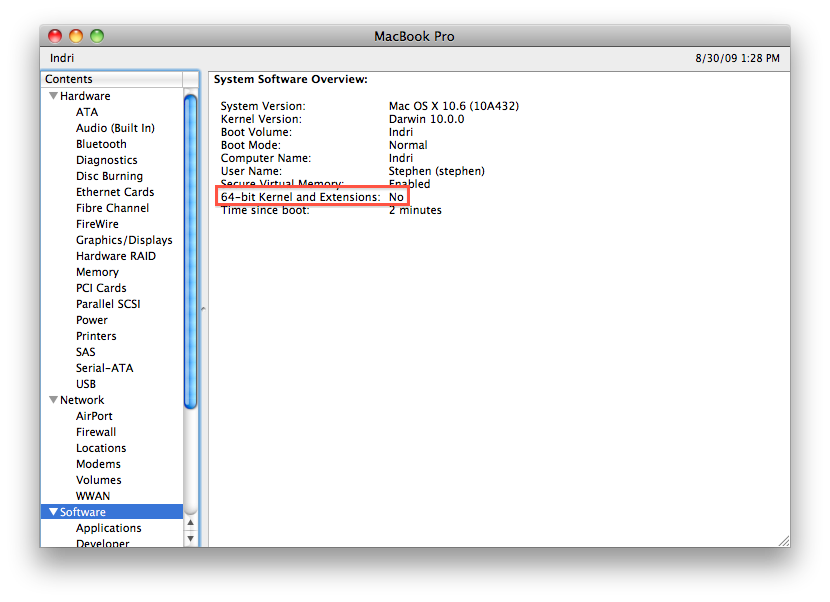
There is clearly a ton of interest in Mac OS X 10.6, Snow Leopard: My Snow Leopard features hardware compatibility chart had over 20,000 visitors in just three days! But one chart element is generating an inordinate amount of interest: Whether or not Snow Leopard can boot in 64-bit mode.
Snow Leopard is a solid but visually unremarkable update to Apple’s OS X family. Although there are many new technical features, it’s not loaded with flash. In fact, even experienced Mac users would be hard-pressed to notice that their system had even been updated!
As I mentioned in that post, I was most-interested in the potential to use Grand Central Dispatch and OpenCL to accelerate my system’s performance. Both features are supported on most Macs built over the last year or two, and they create a great foundation for future development. QuickTime X is interesting as well, though only Nvidia 9400M-based Macs (like my 2009 Mini) support it’s hardware-accelerated H.264 capabilities. The fact that so much of the operating system has been re-written using these modern capabilities is probably the biggest Snow Leopard feature.
Snow Leopard Does Not Boot 64-Bit…
I wasn’t all that concerned about whether the OS X kernel booted in 32-bit or 64-bit mode, but was intrigued to find that Snow Leopard boots with a 32-bit kernel on every Mac other than the rack-mount Xserve.
Much pre-launch discussion revolved around whether or not a given system was even capable of booting in 64-bit mode. There are three critical elements that determine whether a given machine will boot a 64-bit Snow Leopard kernel:
- All system hardware must have 64-bit drivers, including the CPU, chipset, and peripheral chips. The 64-bit kernel exclusively uses 64-bit kexts (drivers), and these are rarer than the 32-bit ones used by Leopard.
- It must use 64-bit EFI (firmware). Even though EFI32 can technically boot a 64-bit operating system just fine, Apple will not allow this. Only Macs made over the last few years include EFI64.
- Apple must allow the system to boot in 64-bit mode. This is the most confusing. Many Macs will not boot Snow Leopard in 64-bit mode even though they are brand new, have no unusual hardware, and include EFI64. This includes all non-Pro MacBooks and Mac Minis.
So there you have it. No matter what you do, Snow Leopard will not boot with a 64-bit kernel and kexts on the majority of Macs. One could understand if there was a lack of drivers or some other technical limitation, as is the case with older Macs, the but this is not the case for the latest MacBook and Mac Mini systems. They won’t boot with a 64-bit kernel because the kernel refuses to boot.
The only Mac model that boots with a 64-bit kernel by default is the 2008 and 2009 Xserve (Xserve2,1 and Xserve3,1) running Snow Leopard Server. The following Macs can boot in 64-bit mode in non-server Snow Leopard if you hold down the 6 and 4 keys on boot or if you modify your “/Library/Preferences/SystemConfiguration/com.apple.Boot.plist” file as described at Netkas:
| Type | Date | Model Identifier |
Sample Model Numbers |
|---|---|---|---|
| Xserve | Early 2008 | Xserve2,1 | MA882LL/A |
| Early 2009 | Xserve3,1 | MB449LL/A | |
| Mac Pro | Early 2008 | MacPro3,1 | MA970LL/A |
| Early 2009 | MacPro4,1 | MB871LL/A, MB535LL/A | |
| iMac | Early 2008 | iMac8,1 | MB323LL/A, MB324LL/A, MB325LL/A |
| Early 2009 | iMac9,1 | MB417LL/A, MB418LL/A, MB419LL/A, MB420LL/A | |
| MacBook Pro | Early 2008 (Penryn) | MacBookPro4,1 | MB133LL/A, MB134LL/A, MB166LL/A |
| Late 2008 (Unibody) | MacBookPro5,1 | MB470LL/A, MB471LL/A | |
| Early 2009 (Unibody) | MacBookPro5,2 | MB470LL/A, MB471LL/A, MB604LL/A, MC226LL/A |
If your Mac is not included in this list, you will not be able to boot Snow Leopard in 64-bit mode. MacBook and Mac Mini models definitely will not boot into 64-bit Snow Leopard. The later Unibody MacBook Pros (5,3 and 5,4) are not listed, and it is not known if they work or not.
…But Why Do You Care?
Why do enthusiasts care so much about the “bitness” of their hardware and software? Geeks have been arguing over the merits of “bigger-bits” for decades. I remember Mac users claiming PCs were inferior because Macs used true 16-bit Motorola CPUs while PCs were stuck with an 8-bit bus. The gaming world did much to foster 64-bit mania, with Atari claiming their Jaguar was the first 64-bit console, and Nintendo even naming theirs the “N64”. But does it really matter?
In theory, a 64-bit operating system should make most-effective use of 64-bit CPUs, increasing performance and maximum addressable RAM. In the case of Intel CPUs, there are many improvements when running the 64-bit (x64) instruction set instead of legacy 32-bit (IA-32) mode. So, from a hardware perspective, 64 bits is definitely superior.
But Mac OS X can run 64-bit applications regardless of the bitness of the kernel. I am writing this post in 64-bit Safari running on a 32-bit Snow Leopard kernel. Many of the applications I normally run are 64-bit in Snow Leopard, including Safari, Mail, and the Finder. This last is important: All Snow Leopard users get a speedy 64-bit ground-up rewrite of Finder, which is their main operating system experience.
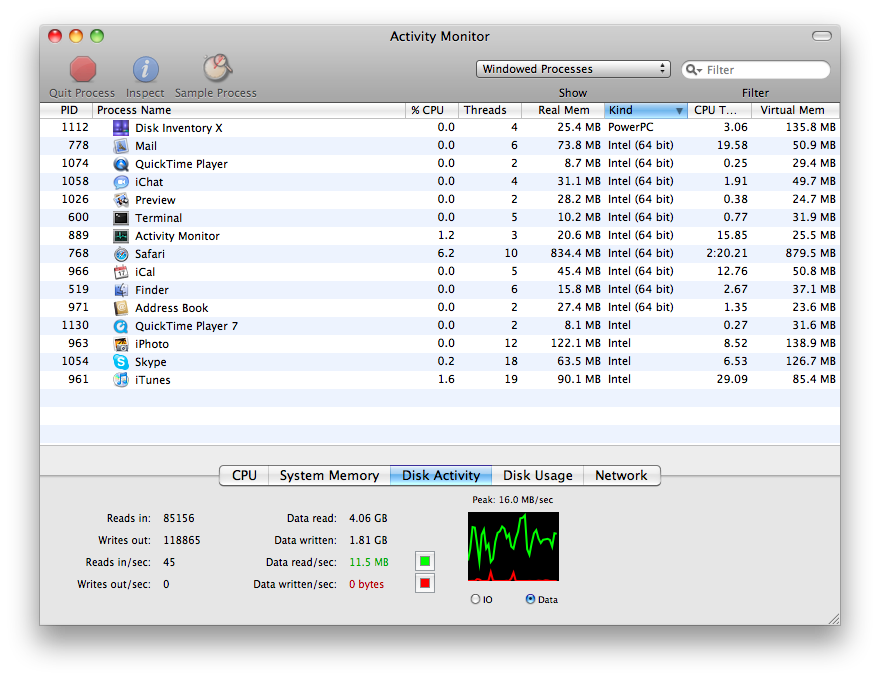
Therefore, regardless of which kernel mode you have booted into, many of your daily activities will use full 64-bit applications. 64-bit versions of iTunes, iPhoto, and Microsoft Office might be nice, but they’re the exception not the rule, and I expect to see these move up to 64-bit soon.
Why do so many Macs not use the 64-bit version of Snow Leopard? One reason is compatibility: The 64-bit kernel requires a full set of 64-bit drivers, and these may have been lacking at launch. Another reason might be that these systems would not see much benefit from running a 64-bit operating system since they are limited to 4 GB of RAM. I would not be at all surprised if later point-revisions of OS X 10.6 enable booting in 64-bit mode by default, at least for the machines listed above and newer models. Those of us with older machines (like this MacBookPro3,1) might never see it, though.
I should note that there are a few 64-bit features lacking in 32-bit Snow Leopard. But some applications, including VMware Fusion, will not run at all under a 64-bit Snow Leopard kernel. And there is the question of driver compatibility. I am not an Apple apologist or fanboy, but I do use Macs 100% of the time for business and pleasure. I think it stinks that Apple now lags behind Microsoft in the race to provide a 64-bit desktop operating system. But the decision is understandable and it has little impact on the daily lives of end users.

You sounded more like a MS apologist with this statement – I think it stinks that Apple now lags behind Microsoft in the race to provide a 64-bit operating system.
BTW SL is not lagging behind MS and in fact SL is the underpin of future iterations of the Mac OS in 64 bit computing.
Stop the FUD.
Stephen,
In your second to last paragraph above you say that you might never see 64-bit Snow Leopard on your MacBookPro4,1. Why? That’s one of the systems that do run the 64-bit Snow Leopard kernel. I’ve set my MacBookPro4,1 to boot 64-bit by default (via sudo nvram boot-args=”arch=x86_64″) and with the exception of not being able to run vmware fusion yet, it works great. Or did you mean you don’t ever expect them to run the 64-bit kernel by default?
I also don’t follow how this situation with Snow Leopard propels Microsoft ahead or pushes Apple behind with regards to providing a 64-bit solution to its users. I wanted to play around with a 64 bit version of Windows a while back and that required me to shell out another $319 for a full copy (or about half if I go and buy some hardware that I don’t need to get the OEM price) of the completely separately licensed version of Vista. I’ll take my Snow Leopard for $29 thank you very much 🙂 I see it the opposite … with Microsoft you must lock in and pay more for the 64-bit OS while with Apple everyone gets mostly 64-bit most of the time and some machines can have all of it all the time.
Perhaps I just didn’t follow your train of thought and maybe you can elaborate …
Thanks,
Dan
Aah, well, I guess you can’t win: Someone always calls you a FUDder or a fanboy for one side or the other!
Thanks for the thoughtful comments, Dan!
Oops – My MacBook Pro is a 3,1 and thus will not boot Snow Leopard in 64-bit kernel mode no way, no how. But your 4,1 does work, as you noted.
As for Microsoft – they’ve delivered a 64-bit version of Vista and Windows 7 that boots just fine on lots and lots of hardware, including my Mac Mini and MacBook Pro. Yes, it costs a fortune. But it works, which is more than Apple has delivered for these machines. Since I could buy a 64-bit version of Windows two years ago, and can still buy it today, that runs on many machines including both of my Macs and yet can’t buy a 64-bit version of OS X that will run, I think it’s hard not to say Apple lags.
But the point of this post is that it doesn’t really matter. Most of the interaction with Snow Leopard is with 64-bit apps, it works great, it’s cheap, so why care if the kernel isn’t 64-bit?
Never on the 3,1?! It’s not even that old a machine! It even has 64 bit EFI! Why the heck not!? I know I can’t go over 4 gigs of ram, but I still would like my OS to take advantage of my hardware.
This is definitely a tempest in a teapot. Running a 64-bit kernel has loads of restrictions (can’t boot Parallels Desktop, for example), but the 64-bit capable CPUs can still run 64-bit apps when booted from a 32-bit kernel. I tried booting with 6+4 keys down on my 2009 iMac and it works, but the incompatibility isn’t worth any theoretical speed gains. The situation is very much like that of Windows, and neither one is going to change anytime soon.
This site explains it very well: http://www.ahatfullofsky.comuv.com/English/Programs/SMS/SMS.html
As a quick test I’ve tried booting a new MacBookPro5,5 into the 64-bit kernel, by pressing “6” and “4” during the boot/restart process, but without success. It still lists “64-bit Kernel and Extensions: No”. It seems strange, but maybe there is a driver issues on the newer models that I have not tried any of the other methods (e.g. editing com.apple.boot.plist) to try and force booting into the 64-bit kernel.
Hmmm. I was surprised that I was running a 32 bit kernel on Snow Leopard. In activity monitor, for example, there were plenty of 64 bit apps running. So I had to run system profiles to determine that indeed a 32 bit kernel is running.
Clearly, this is not the case for Windows or Linux. 32bit Windows , with which I am most familiar can’t use greater than 3.5G of memory. Nor can 64 bit apps run on 32bit Windows.
Then I remembered that OS X is really Mach OS, a microkernel. Most, if not all, Mach OS implementations featured a BSD Unix emulation layer, not that they were really running BSD Unix. It was something better!
Clearly we are getting many of the benefits of 64 bit OS even with the 32 bit kernel loaded. I wonder if anyone could explain what advantages if any exists for using a 64 bit kernel.
Ack; okay that makes sense although I think that the score is even between M$ & A$ 🙂
Anyway, both of my Apple systems are running with the 64-bit kernel. The only add-on hardware I have is an SD card reader in my MBP and it still works.
I am excited to report that I have found a work-around for VMWare Fusion/Parallels not working in 64-bit mode. It’s called : Virtual Box. Virtual Box seems to be working perfectly with my Mac Pro while running the x86_64 kernel and itself is a 64-bit application … unlike VMWare Fusion.
This whole VMWare Fusion incompatibility with the 64-bit kernel has been a benefit for me as I wasn’t aware how polished and usable Virtual Box was. If you guys haven’t tried it, give the Mac version a try at: http://www.virtualbox.org !
Dan
I hate to be nit-picky, but for clarification and the benefit of other users who may be confused by the 64-bit labyrinth (honestly, I’m JUST now getting my head around it), shouldn’t the following line…
“This last is important: All Snow Leopard users get a speedy 64-bit ground-up rewrite of Finder, which is their main operating system experience.”
…say this…
“This last is important: All Snow Leopard users -[who have a 64-bit capable CPU and have the 64-bit EFI]- get a speedy 64-bit ground-up rewrite of Finder, which is their main operating system experience.”
I have the iMac4,1 model iMac running Snow Leopard and it seems clear that nothing is running in 64-bit according to System Profiler. And the Terminal EFI check command:
ioreg -l -p IODeviceTree | grep firmware-abi
…reports only having the 32-bit EFI. It’s all very confusing and making my head spin, however, even at 32-bit, Safari and other core Snow Leopard apps and processes are a lot faster.
Thanks for the post. It was very helpful.
“In fact, even experienced Mac users would be hard-pressed to notice that their system had even been updated!”
Nonsense! The speed boost alone is glaringly obvious.
I think itSome people who agonise over absolutely meaningless technical specifications might think that it stinks that Apple now lags behind Microsoft in the race to provide a 64-bit desktop operating system. But the decision is understandable and it haslittle impactno discernible impact whatsoever on the daily lives of end users.Fixed that for you.
Found system preferences application that switches kernel mode: http://www.thrull.com/corner/mac/SystemModeConfigurator/
Parallels has been booting fine on my MacBook Pro with 64-bit kernel for over a week. I guess there was an update from Parallels although I don’t remember installing it.
Virtual box is great until you try to use a USB device with it, at which point the guest OS refuses to suspend any more and just ‘aborts’ out – always hosing your session every time to quit the vm.
*sigh*
To me at least, that’s much more important that 64-bitness.
We purchased the systems that are not supported as 64bit systems then were told to wait until the OS catches up. Now Apple has pulled a bait and switch.
I and others on LinkedIn are currently looking into a Class Action Suit to be filed against Apple. Either Apple needs to release a firmware upgrade or they need to start replacing systems.
Help with the fight and contact your Attorney General. If in New York, We have several people pursuing this already.
I’m not exactly sure what you complaining about here. A 64-bit kernel is not absolutely required to have the full benefit of 64-bit code running on your 64-bit machine. In fact, a 64-bit kernel isn’t even required to use more than 4GB of system memory. My quad i5 iMac is running just fine with 8GB of RAM on a 32-bit kernel. I’m still using VMWare Fusion 2.0.5, so I’ll probably stick with the 32-bit kernel for a while.
If you can point out something that you are missing because your kernel isn’t running in 64 bit mode, then it’s a different issue — but Apple has really thought things through and given you the complete benefit of your 64-bit machine even though it uses a 32-bit kernel.
I'm not exactly sure what you complaining about here. A 64-bit kernel is not absolutely required to have the full benefit of 64-bit code running on your 64-bit machine. In fact, a 64-bit kernel isn't even required to use more than 4GB of system memory. My quad i5 iMac is running just fine with 8GB of RAM on a 32-bit kernel. I'm still using VMWare Fusion 2.0.5, so I'll probably stick with the 32-bit kernel for a while.
If you can point out something that you are missing because your kernel isn't running in 64 bit mode, then it's a different issue — but Apple has really thought things through and given you the complete benefit of your 64-bit machine even though it uses a 32-bit kernel.
The iMac4,1 is a Core 1 Duo — that is a 32-bit chip. Your machine will never run any 64-bit processes, no matter how many updates Apple makes to the firmware or the OS.
The iMac4,1 is a Core 1 Duo — that is a 32-bit chip. Your machine will never run any 64-bit processes, no matter how many updates Apple makes to the firmware or the OS.
This happens only if you don't configure it properly. Go on therir forums and you will get some literature about this. Version 3.1 is much improved in this regard.
This happens only if you don’t configure it properly. Go on therir forums and you will get some literature about this. Version 3.1 is much improved in this regard.
You are wrong, my friend. The “64-bit Kernel and Extensions” is labeled as NO if you are in 32 bit. 64 bit doesn’t boot by default, but you can boot it. Just hold down the “6” and “4” keys during startup, before your Mac makes the startup sound. Sometimes, if you don’t do it quick enough, it won’t work. You can know by checking back to the same page you are on, and if “64-bit Kernel and Externsions” is labeled as YES, then it is booted in 64-bit. It really doesn’t make a difference, but some geeks care about that.
64 bit applications would only run as 32 bit applications on a non-64 bit kernel. It’s impossible to run 64 bit instructions without a 64 bit kernel…
I am surprised that Apple doesn’t support Snow Leopard Server in full 64 bit mode on the Mini, since Apple is bundling the two. Servers, especially when juggling big databases or render apps, would seem to be the sweet spot for 64 bit apps, no?
There shouldn’t be software compatibility issues, as most apps running on a server will be the same as on the mini’s big brothers; there’s been plenty of time (and a couple of recent updates) to tweak the hardware if necessary; and the server has enough CPU moxie that one might very well want the extra security and anti-obsolescence of 64 bits.
This suggests that a 64 bit kernel is less of a big deal than some make it to be.
if you have 64bit EFI it can be done with a bit of hacking around.
root@bigmac ~ $uname -a
Darwin bigmac.local 10.3.0 Darwin Kernel Version 10.3.0: Fri Feb 26 11:57:13 PST 2010; root:xnu-1504.3.12~1/RELEASE_X86_64 x86_64
root@bigmac ~ $system_profiler | grep Model
Model Name: Mac mini
Model Identifier: Macmini3,1
Sue them! That’s a great idea. You probably walk around looking for people and companies to sue.
I saw that article mentioning how the last Mac mini was not able to be 64 bit with Snow Leopard. Can the 2010 Mac mini do this I wonder?
If you boot into a 64bit kernel, none of your 32bit device drivers will work, so people who are upgrading will struggle.
Yes, I just got the 2.4GHz unibody style Mini and it will boot the 64 bit kernel if you hold the 6 and 4 keys while it boots, I didn’t expect it to but tried it anyway and it sure did.
If you have a Mac and you wanna check if you can use 64-bit type this command in Terminal: ioreg -l -p IODeviceTree | grep firmware-abi if it returns “firmware-abi” = ” you will be able to boot with 64-bit Kernel and Extension (just checkout http://blog.leanopen.com/2010/04/23/doesnt-your-mac-mini-want-to-boot-in-64-bit/) if it return you can’t do this trick.
I bought CS5 Master Collection JUST so I could have After Effects CS5 for school. I have a mac mini w/snow leopard that I can NOT get to boot with 64 bit capability. I need help. I did the 6 and the 4 hold down which some of you say worked for you. No go here. Can anyone help me please?? I spent alot of money and would’ve just stayed with CS4 if I knew about this hassle before hand. Seems like SOMEBODY at Adobe coulda mentioned this problem….
In 2007 Apple stated to its consumers the Mac Pro was 100% 64-bit edition Steve Jobs himself use the words OS X 10.5 Leopard is 100% 64-bit you can still watch the keynote. Facts are this many people myself included believed when Apple compared their Mac Pro so famously against a Dell workstation they advertised the Mac Pro came out the better price and because of Boot Camp was 100% equal to the Dell workstation now tell me this can you run any version Windows in 64-bit on a 2006 or 2007 Mac Pro? answer is no you cannot so really people like me that use both OS X and Win programs were not told about Vista not being able to run 64-bit until our machines were least one year old. Now tell me this was their difference yes there is a Dell is not limited by an EFI to only run 32-bit operating systems outside of OSx don’t tell me you care about only Mac programs are not talking about you I’m talking about why I bought it and feel it is not 100% 64-bit. Apple lied