iPhone OS 3.0 was released today, and I’ve had a chance to play with it for a bit now. I am very impressed with the improvements Apple has made, and think that 3.0 will be much more welcome in Microsoft Exchange environments. However, it’s still not quite up to the high standard set by the BlackBerry.
Wondering how to get Exchange working in 3.0? Start here:
How To Set Up iPhone Exchange ActiveSync
Major Changes
Apple made some significant updates to all three of the components touched by ActiveSync: Mail, Calendar, and Contacts.
- The Calendar has been totally re-done, more smoothly supporting multiple calendars, syncing with local calendars and Exchange at the same time, CalDAV and .ICS natively, and allowing on-phone creation of meeting invitations for Exchange users.
- The Contacts application can now sync with local address books and Exchange at the same time.
- Mail is more flexible, with per-folder downloading of Exchange messages.
As I noted last month, however, OS 3.0 is not all roses. In particular, the following issues continue to haunt the phone:
- The iPhone only supports full ActiveSync with a single Exchange server. Although you are free to establish as many IMAP connections as you like, including connecting to Exchange with IMAP, you cannot use more than one ActiveSync service.
- Still no notes and tasks sync (with Exchange). Although iPhone OS 3.0 does allow synchronization of notes with Apple Mail for Mac users, it does not support Exchange or Apple’s own MobileMe over-the-air services.
- No public folder support.
- ICS and CalDAV seems to be desktop-sync only.
- Spotlight does not include full-text search of mail messages.
- Push email remains slow, flaky, and battery-consuming. This is a very tough nut to crack!
The mail application gets numerous improvements for all mail servers. Notable among these is landscape mode and spotlight search. When it comes to Exchange ActiveSync, the changes are harder to notice. One thing that struck me was the ability to specify which folders to “push” along with the Inbox. Perhaps this was there all along and I missed it, but I never noticed it before.
Note that the Push settings have been moved under “Mail, Contacts, Calendars” in OS 3.0.
Calendar
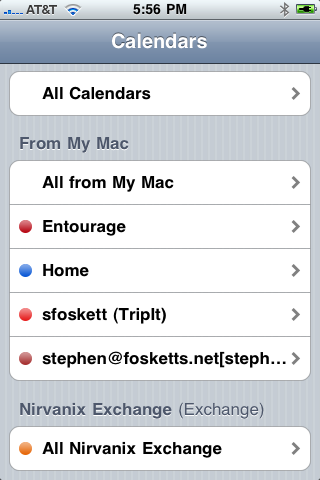
Although iPhone OS 2.0 supported multiple calendars, it was very confusing and not at all integrated with Exchange. OS 3.0 has cleaned things up significantly. As illustrated, the iPhone now organizes calendars into categories: Those synced from the Mac or PC and those synced over the air from an Exchange server.
That’s right – the iPhone can now sync calendar entries over both USB and Exchange at the same time! This is super handy, since iTunes supports CalDAV and ICS subscribed calendars through iCal on OS X, and presumably on Windows as well. I’ve written before about TripIt’s solid iPhone app, and this gives another way to view trips. But the iPhone doesn’t seem to support either CalDAV of ICS over the air, which is something of a disappointment. We can’t have everything, can we? Update: I missed it! iPhone OS 3.0 does include over-the-air CalDAV and ICS!
Of course, the new spotlight search supports calendar entries as well, allowing quick access to appointments.
Perhaps the most-anticipated calendar feature for iPhone OS 3.0 is meeting invite support. I can confirm that it is possible to create a meeting, add attendees, and send invites right from the iPhone, and that this works over the air! This is a specific Exchange feature, so of course it only works for the Exchange calendar. But you can easily change an existing non-exchange item to the Exchange calendar and start inviting attendees, even those not using Exchange.
But there are still limitations. You cannot add invitees to someone else’s meeting. You cannot make any changes to an appointment synced from the desktop (CalDAV and ICS included). You cannot forward a meeting request from the calendar app. You cannot see free/busy time when scheduling. It’s not like you have Outlook in your pocket!
One more weird thing I noticed: Nearly every app now has a landscape mode, including mail and contacts, but calendar is locked in portrait only!
Contacts
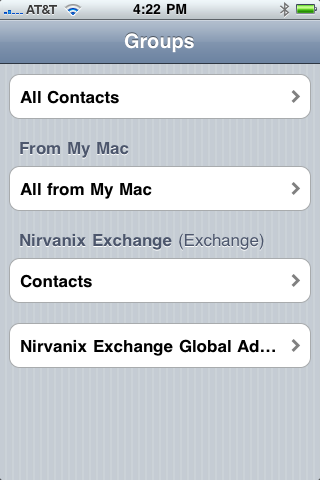
The other application to see some updates is Contacts. Like the calendar app, Contacts can now sync to both local desktop and over-the-air Exchange sources at the same time. The iPhone sync combines desktop sources into an “on my iPhone” category and maintains Exchange contacts separately. It also includes access to an Exchange global address list (GAL), and this seems to work much better now than it used to.
Contact management is somewhat limited, however. If you locate a user in the GAL, you can’t add them to your Exchange or iPhone contact list without copy and paste (did I mention that it works?) or finding an email message from them. The phone also has no de-duplication features, so if your desktop contact list is synced with Exchange already you will have a world of duplicate entries.
Summary
All in all, iPhone OS 3.0 is a worthwhile upgrade, especially for business users. Everything seems to work more smoothly and logically than in 2.0, and the added Exchange calendar invite support is great. The complete set of additions, from copy and paste to spotlight search, are excellent as well. But, like the Mac, the iPhone remains just a bit left-of-center in the world of business and Microsoft Exchange. Maybe that’s for the best!
Check out Paul Robichaux’s comments on 3.0’s mail as well!

Stephen,
I recently bought my first iPhone a little over a month ago (missed a 3Gs swap by 2 days). I was happy to see that Google has licensed at least a portion of ActiveSync. I am able to sync my Google Contacts and Google Calendar OTA using GoogleSync for iPhone. It's not perfect:
1) Google doesn't use ActiveSync for email, so I have to use IMAP.
2) There's now way to Sync Google Contacts with Address Book on my Mac. It is an either/or situation. I can sync OTA with the iPhone OR I can sync with Address Book but not both.
3) Calendaring is interesting when you have your iPhone subscribed to Google Calendar and iCal subscribed to Google Calendar. Invitations and responses don't flow smoothly.
The setup works great for me today and I'll be interested to see how it changes…if it changes with an upgrade to 3.0. I'm also sure that Google, as always, will continue to improve their products like GoogleSync.
Steve, most of the calendar changes you mention above have been present since iPhone 2.0, at least if you’re using MobileMe to sync OTA. I have my primary work account synced with EAS, and my home Exchange account synced through Entourage/Sync Services to MobileMe. It’s not perfect, but it works fairly well, with the exception that events don’t always instantly sync.
I wrote my own review of 3.0 from a mail device perspective, too; it’s at http://www.robichaux.net/blog/2009/06/the-iphone-as-a-mail-device-30-edition.php.
There are three main areas Apple changed the calendar from 2.0: It now can sync through iTunes (including CalDAV and ICS calendars) as well as Exchange (and presumably MobileMe), which is nice if you’re not a $99/year payer to Apple. But not that nice since it’s not OTA… The second is that it is much cleaner when handling multiple calendars, showing which calendar is which. Third is the most hyped addition, which is on-device meeting invites.
All of this seems pretty pathetic compared to what other platforms already had, though. Maybe 4.0 will really be competitive with RIM, Microsoft, and (gasp) Palm!
Any word on certificate-based authentication for Exchange ActiveSync ? This was listed as unsupported in the 4th edition of Apple’s guide for Enterprise use of the iPhone. Thanks for your great comments!
Stephen,
I recently bought my first iPhone a little over a month ago (missed a 3Gs swap by 2 days). I was happy to see that Google has licensed at least a portion of ActiveSync. I am able to sync my Google Contacts and Google Calendar OTA using GoogleSync for iPhone. It’s not perfect:
1) Google doesn’t use ActiveSync for email, so I have to use IMAP.
2) There’s now way to Sync Google Contacts with Address Book on my Mac. It is an either/or situation. I can sync OTA with the iPhone OR I can sync with Address Book but not both.
3) Calendaring is interesting when you have your iPhone subscribed to Google Calendar and iCal subscribed to Google Calendar. Invitations and responses don’t flow smoothly.
The setup works great for me today and I’ll be interested to see how it changes…if it changes with an upgrade to 3.0. I’m also sure that Google, as always, will continue to improve their products like GoogleSync.
Stephen,
Thanks for the update. One MAJOR (IMHO) omission in the calendar app in comparison to the blackberry is smart dialing. This is probably the thing I miss the most in moving from Blackberry. Being able to do a single tap on “800-555-1234 x5551212” in a calendar entry and have it dial, pause, and enter the passcode on one step is incredibly useful if you’re doing con-calls regularly.
I really thought they’d add this in 3.0. Doesn’t anyone in Apple do con-calls?
Yep. And you cannot create a new CALDAV calendar event from the iPhone. It will not WRITE to the CALDAV calendar, it writes to the default calendar — which can only be a local iCal calendar. DRAT!!!
Check out my next post, Kevin! Turns out you can directly subscribe to CalDAV calendars over the air in OS 3.0, including Google Calendar. My initial tests show that this works great, with 2-way sync and full editing. The only thing missing is invitations…
I think this actually DOES work! I’ve got a number of numbers programmed as “1-800-555-1212,,,123” and the iPhone dutifully pauses and then dials the extension. It really mashes those numbers, too. It’s all “beeeeeeeeeep beeeeeeeeeep beeeeeeeeeeep”.
Now if only Skype supported this!
Check out my next post! If you directly subscribe to the CalDAV calendar you absolutely can create abd modify CalDAV entries!
Does it work inside the CALENDAR app??? I wasn’t working in the 3.0 seed that a friend had installed.
You’re right! Dialing from the Calendar is sketchy and this definitely doesn’t work. This stinks. Apple, are you listening?
Really? All of the iPhone OS 3.0 documentation states that CalDAV subscriptions are read-only on the iPhone.
I’ll be darned….it works.
Stephen,
I recently upgraded software to the 3.0 and now cannot set up my exchange account. It worked fine prior to the upgrade. Do I have to do somehthing diffeferent?
Thank you
Outlook Notes update through iTunes synch.
I am not connected to an ActivSynch server. With 3.0 software, my outlook notes have authomatically synched. On the “Info” tab of the iPhone on iTunes, the last items is “Notes” and the only option in the drop-down for me is “Outlook”. It works! Now, just waiting for tasks…
I have four calendars setup in my iPhones exchange (4 calendars from the same google account). Only one of the calendars will allow me to send invitations. Any ideas what I need to do to get the other three to work?
After installing 3.0, the calendar sync has a problem. When someone sends you a meeting invite now, if you accept on your desktop, the meeting does not show up on the iPhone calendar. Someone else in my office is having the same problem.
Anyone else?
Thanks for the very helpful posts on configuring activesync. Regarding outlook calendar appts – I discovered there is another limitation with respect to public versus private appointments. Outlook allows you to make an appoinment private so that people with access to your outlook calendar cannot view the appointment subject, but this feature doesn’t appear to be exposed in iPhone OS 3.0.
Thanks for the very helpful posts on configuring activesync. Regarding outlook calendar appts – I discovered there is another limitation with respect to public versus private appointments. Outlook allows you to make an appoinment private so that people with access to your outlook calendar cannot view the appointment subject, but this feature doesn't appear to be exposed in iPhone OS 3.0.
Its really cool, I came to know this really worth visiting, just bookmarked your site.
http://gisnap.com/
The place where fun never ends
Thanks you for information.
We need backup our iPhone
It doesn’t work, unfortunately.
And i paid 19 euros!
We are using Exchange ActiveSync to Sync with our Outlook Contacts Database. I have duplicate contacts on my iPhone. Can you tell me how to get rid of the duplicate contacts? We have over 7,000 contacts in our Outlook Database (ie. 14,000 contacts on my iPhone. Thank you
Stephen, great article! It’s a bummer that the iPhone still only supports full ActiveSync with a single Exchange server. However, I came across an article the presents a neat workaround, with and without jailbreak. I tried it on my non jailbroken iPhone and it works wonders. http://luciendantuma.wordpress.com/2010/02/26/multiple-exchange-calendars-on-your-iphone-without-jailbreak-2/
We use passcodes extensively for our conference calls and dialing from the calendar, or from an email is still impossible and extremely dangerous on the road. The only way around is to program all your conference calls into a contact or contacts prior to the day you have to make them. Does anyone know of an application that has solved this or that would make it easier?
Thanks for sharing this very nice info.