One of the iPhone OS 3.0 features touted by Apple at WWDC was the ability to subscribe to Internet calendars in CalDAV and iCalendar/ICS format. On first testing OS 3.0, I discovered that these calendars could indeed be synchronized from my Mac’s iCal application through iTunes, but that these would not update over the air. However, on closer examination I have discovered that, indeed, iPhone OS 3.0 does allow direct over-the-air subscription to Internet calendars!
Check it out! How To Keep Your Family Activities In Sync With A Shared Google Calendar
This is really a major advancement for the iPhone platform. With 3.0, you have many different calendar synchronization options and can mix and match, using all or none as you see fit:
| Local iTunes Sync | Over-the-Air Sync | Read/Write | Invitations | |
|---|---|---|---|---|
| Exchange ActiveSync | Yes | Yes | Yes | Yes |
| MobileMe | Yes | Yes | Yes | No |
| Google CalDAV |
Yes | Yes | Yes | No |
| iCalendar/ICS | Yes | Yes | No | No |
How to Subscribe to a CalDAV Server (Like Google Calendar)
CalDAV is a powerful open protocol for calendar event synchronization. Lots of services support it, including Google’s free Calendar application, which is part of gmail and Google Apps. It’s a mash-up of WebDAV and ICS and supports two-way synchronization, notes, alerts, and such. iPhone OS 3.0 includes CalDAV as a supported protocol for over-the-air subscription and synchronization, so it can seamlessly synchronize your Google calendar with your phone calendar. Unlike ICS, however, you can create and edit CalDAV entries on the phone and the changes will quickly show up in your Google calendar.
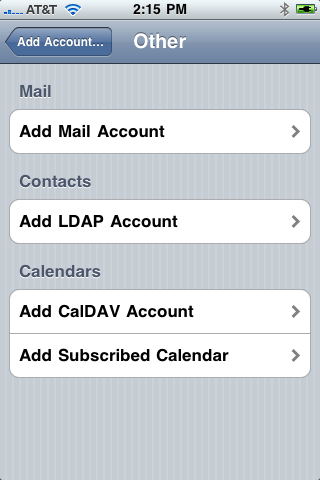
Setting up CalDAV, though hidden, is pretty slick. Follow these steps:
- On the iPhone, select “Settings”
- Select “Mail, Contacts, Calendars”
- Select”Add Account…” under “Accounts”
- Select “Other” at the bottom
- Select “Add CalDAV Account”
- Enter “www.google.com” for “Server” – the iPhone will automatically identify this as a google CalDAV server!
- Enter your gmail user name (e.g. “sfoskett”) or full google apps username and domain (e.g. “[email protected]”) for “User”
- Enter your password for “Password”
- Optionally modify the description
- Select “Next” and you’re done!
The iPhone recognizes Google Calendar – it’s smart enough to “know” that when you enter “www.google.com” as the CalDAV server it needs to correctly format the URL for Google. Other CalDAV server types might need some tweaking, which you can do in the Advanced tab of the CalDAV’s account in Settings.
All CalDAV calendars are bi-directional, meaning you can create or edit entries and they will (eventually) synchronize on both the phone and calendar server. In my tests, items modified on the iPhone showed up almost immediately, while changes made on Google’s calendar server took a few minutes to show up.
Two notes on CalDAV:
- Although the documentation says it’s read-only, my Google Calendar absolutely, definitely, is read/write: I can create and modify appointments in the Google Calendar on the iPhone and it shows up online.
- The “Sync events x weeks back” limit in settings does not apply to CalDAV or ICS! Large numbers of events will cause Calendar to be very, very slow. Beware!
Other popular apps also support CalDAV, including Apple Leopard Server’s iCal Server, Yahoo Calendar, and Zimbra.
I use this capability as a shared family activities calendar. What ideas do you have?
How to Subscribe to an iCalendar Server/.ICS feed
iCalendar is an older calendar subscription format, and many servers offer .ICS feeds of calendar entries. I particularly love TripIt‘s free travel itinerary service, which is available as an ICS feed. iPhone OS 3.0 also includes iCal as a supported protocol for over-the-air subscription, so you can view your ICS feeds right in your phone calendar. Note that iCalendar is read-only, like an RSS feed, so you cannot create or edit items on the phone.
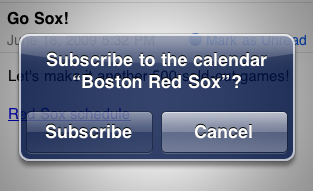
The simplest way to subscribe to an ICS feed is simply to email the link to yourself. The iPhone interprets any URL ending in “.ics” as a iCalendar feed and asks if you want to subscribe. This ensures that the link is typed correctly.
Note: This no longer works in iOS 4.2! Now you have to add it in Settings. See Apple Breaks ICS Calendar Auto-Subscription In iOS 4.2.
If you need to manually set up an iCalendar feed, it’s very similar to CalDAV. Follow these steps:
- Locate the calendar feed you want to use and copy it using OS 3.0’s new copy and paste features
- If you use TripIt, log into your account in the iPhone Safari browser
- Select the “iCal Feed” icon in your main page
- In the popup, select “Subscribe to calendar feed”
- Tap and hold the resulting URL (which begins with “webcal://”) until the “Copy” box appears
- Tap “Copy”
- Go back to the hope screen and select “Settings”
- Select “Mail, Contacts, Calendars”
- Select”Add Account…” under “Accounts”
- Select “Other” at the bottom
- Select “Add Subscribed Calendar”
- Select the “Server” box and tap “Paste”
- Select “Next”
- Optionally modify the description
Updates to the iCalendar feed will now show up in your calendar. These are read only, of course, but it’s awfully nice to be able to subscribe to a TripIt or Dopplr feed or the Red Sox schedule on your phone!
One more time: The “Sync events x weeks back” limit in settings does not apply to CalDAV or ICS! Large numbers of events will cause Calendar to be very, very slow. Beware!

Have you found a way to see secondary calendars on the same account?
We have an xServe where team calendars (through iCal) are set up. In my laptop I am subscribed to this account, I see all the calendars available and I only see the checked ones (in this particular case, only mine).
I set up the iPhone 3.0 according to your indications (many thanks!) but all the calendars appear at the same time. Is it a way to select only the one in which I am interested? Note: I can see only my activities if I select my specific calendar but that alternative has the inconvenience of demanding me two checkings (the one in the Server and my MobileMe).
If there is of any interest, I am a consultant and my colleagues scheduled activities for me in the server.
Thanks in advance.
Stephen,
I have discovered a drawback to CalDAV with Google versus GoogleSync (a la ActiveSync). Both CalDAV and GoogleSync give me the ability to create events from either my iPhone or my Google Calendar. However, with my GoogleSync calendar, I can actually edit events on my iPhone to set the alert. I cannot do this though my CalDAV connection.
For example, I had an event set to alert me 10 minutes prior to the event. I wanted to change that to “2 hours before”. I could not change that through CalDAV but could through the GoogleSync’ed calendar.
I’ve also noticed that all event displayed in my Google Sync’ed calendar show as “accepted”…ie a solid color. All events in my CalDAV calendar show as gray with a dashed border until I formally accept them from within Google Calendar.
-Kevin
Is there a way to subscribe to subcalendars ???
Awesome post. For a while I didn’t think I was going to be able to see my MS Outlook calendar from work and my Google calendar at the same time on my new iPhone 3GS.
Thanks for writing this post…It’s awesome…However, this only shows the main calendar.
To get your other calendars, you’ll need to repeat the above for each (with distinct Descriptions otherwise it’ll be confusing), then edit that CalDAV account, and under “Advanced Settings” change the “Account URL”. You can get this Account URL by clicking the down arrow next to your calendar at calendar.google.com and selecting “Calendar Settings”. You should find your Calendar ID next to the XML, iCal, HTML links in the Calendar Address section. Insert this Calendar ID into an URL like so: https://www.google.com/calendar/dav/[email protected]/user . You can email this to yourself, then leverage the new copy&paste feature of 3.0 to avoid typos.
Sorry small mistake…
Copy the Calendar ID that’s next to the “XML” “ICAL” “HTML” icons then paste it into the following string and replace “[GOOGLE_ID]
https://www.google.com/calendar/dav/%5BGOOGLE_ID%5D/user
Now copy the entire link and email it to yourself.
THank you Stephen for this perfect overview concerning calender management. I have one qustion to the point “How to Subscribe to an iCalendar Server/.ICS feed”:
I use active sync for googlesync (calender+contacts). Perfect.
My second calender from MS Office is available over Office online, so I tried to subscribe the way as you told us. Unfortunatelly the URL for my “*.ics” does not begin with “webcal://” but with “webcals://” (including the s at the end), probably the difference why I cannot subscribe?
Do you have any idea to use the icalender Server for MS Online, or better, is there a known way to subscribe to a CALDAV server for the available Office Online data?
Would be very helpfull, if someone knows a solution.
Thank you very much in advance.
Can ActiveSync work with my AOL calendar on my iPhone?
How do you remove a subscription of a calendar from the iphone?
To remove an iPhone subscription, go into Settings, Mail…, and the calendar account and press the big red Delete button.
How about if there IS NO CALENDAR listed but there actually is one? Well, after looking around at all sorts of web sites, including apple.com, and not finding anything useful, I got mad. Having messed with computers and the like for over 20 years, I am a good guesser… I told the thing to create a new calendar account, put in exactly the same info that I did the first time I created a Google calDAV account, and there was the account and the big red Delete button. Hit delete and got a message that calendar was being turned off (or something like that). No more extra calendar. I am not impressed with the calendar stuff on the iphone.
I cannot do this though my CalDAV connection.
Find more jobs: http://www.staffingpower.com/
I have the same issue. I have stored my work calendar (which I cannont share in any other way) as an *.ics on Office Online. I can subscribe to in in my home Outlook, but not on the iPhone. The only difference from Carsten is that the subscription link starts with “webcal://” (without the ‘s’) but I don’t think that matters, since the iPhone cuts out that initail part when pasting the URL. I could really need some help in sorting this out
I was able to get my default calendar to sync with the iPhone using CalDAV, but not the other two calendars I created. Any ideas?
Hi Chris,
I assume you are taking about Google Calendar in your comment. If so then the other calendars are easy to sync.
1.) Goto Google Calendar
2.) Settings
3.) Click on Calendars tab.
4.) Click the calendar you want to subscribe.
5.) Under the private address click on the ICAL icon.
6.) Copy this link.
7.) email the link to yourself somehow.
8.) on your iPhone open the email and click on the link. The calendar will be added to your iPhone calendar.
Enjoy…
Great post! Problem: Went on Google, created a calendar, double checked the user name and password, created the account on my (new) iphone successfully, BUT it says password incorrect. I am sure I am entering the same one as I am using on the web site but it does not recognize it! Any ideas?
hi can some1 plz tell me y i cant write or modify my google calender from my i phone 3g when for some reason it wont let me sync it niether can u plz email me your ansers to [email protected] ty very much
This seems to crash my settings app every time I try to do it.
My wife has subscribed to my yahoo calendar which she can now see on her iphone. However she can’t edit any entries of mine. Is this possible?
as of iphone os 4.2 (maybe even 4.1) .ics links no longer pop up a message asking if you want to subscribe
Hmmm – I just tried it on my iPhone (which is at 4.1) and my iPad (at 4.2) and you’re right: It stopped working in 4.2. This stinks!
Update: This still works in Mail, just not in Safari. I’m calling it a bug.
I emailed the .ics file to myself and clicked it in iMail, it showed me a list of the events as a list with a small “Add Events” button at the top.
Have anybody been able to setup web calendar for Microsoft? I have a link
webcal://calendars.office.microsoft.com/pubcalstorage/…./My_Address.ics. I am able to add it to my Microsoft Outlook and it shows fine. When I follow instructions above, I get a message “Unable to verify”. Are there any tricks to get this working? Alternatively, I could synch it with iCloud or iTunes with my Outlook on the coomputer, but neither of them see the this web calendar. Any suggestions?
Hi everyone,
I’d like to add a suscribed calendar to my iOS 6- iPhone so I followed your method but it doesn’t work. Here is the link :
http://doculille.edhec.edu/edt2001/g57190.ics
Do you have any idea ?
Thanks
Fred