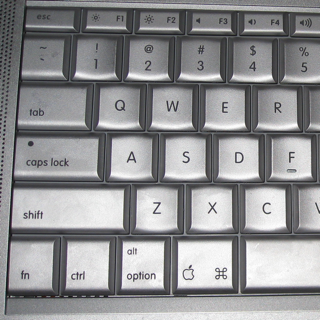
 The lowly computer keyboard is so ubiquitous that it can seem unchanging, but nothing could be further from the truth. It is one of the most important components of any system, and has survived all assaults by new technologies from the mouse to the pen to the microphone, yet its evolution is marked by legacy functions and terminology that can leave computer users scratching their heads. Today we deal with an issue that has faced many over the past decades: How to use a PC keyboard with a Macintosh and vice versa.
In this era of switchers, Boot Camp, KVM, USB, and virtualization, the question of how to deal with computer keyboard irregularities has become all the more important. One of the most critical usability factors in cross-platform typing is the question of what to do about the so-called modifier keys: Control, Command, Alt, and the like. See, each platform has its own key combinations for GUI shortcuts and common operations like copy and paste. And although most are similar, they are different enough to frustrate even the expert user.
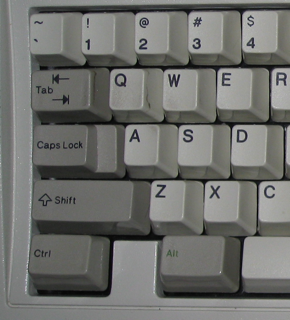 The Alt and Control keys found on most PC keyboards date from the first PCs, with so-called Windows and Menu keys introduced in 1995 and Fn or Function modifier keys found on laptops both before and after. Combined with the Shift key (which pre-dated the personal computer) these are the most common modifier keys used today.
Most Windows commands use some combination of Ctrl, Alt, and Shift but the mapping is haphazard at best. Generally, Alt-combinations control the GUI (switching windows and selecting menus) while Ctrl-combinations perform actions (copy and paste) but this is not always the case. However, even though variations abound, the standard 101-key IBM layout dating from 1986 (shown at right on a 1987 IBM Model M) has dominated. This places two “Ctrl” keys at the outermost position of the bottom row of keys with two “Alt” keys flanking the space bar. The Windows, Menu, and (on notebooks) Fn keys are squeezed in between Ctrl and Alt.
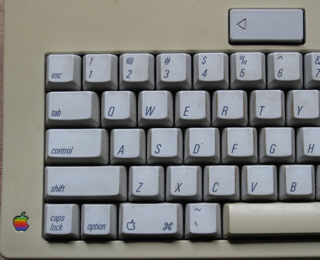 The situation is quite different on the Macintosh. Hardware-wise, the Mac inherited the Command (“open apple”/”cloverleaf” ⌘) and Option keys found on the Apple IIe of 1982, and added a Control key with the Mac II and SE to enable business-friendly terminal emulation capabilities. As seen in the keyboard at right from my Mac SE, the Control key, as on the PC XT, occupies the space now associated with Caps Lock at left in the third row, while the Option and to-be-named Command key (with the Apple outline) sit roughly where the Windows and Alt keys would eventually live.
The popular Apple Extended Keyboard swapped Caps Lock and Control, settling the key layout of the Macintosh that has lasted through today, and added “Alt” to the Option key, clarifying its purpose. In 2007, Mac fans were thrown into a frenzy as Apple made one more change, removing the Apple from the Command key and (finally) adding the word, “Command”, in its place.
If you’re a geek like me, you will find the history of these keys to be an interesting aside. Wanting to add more functionality to their (integrated) keyboards, most early personal computer makers looked for ways of adding modifier keys without “breaking” existing programs, which were hard-coded for earlier layouts. Most manufacturers settled on the so-called “Bucky bit” strategy, adding keys that modified the binary ASCII code from other keys. Alt set the eighth bit to 1, turning H (01001000) into 11001000, which could be a non-printable control character or one from another character set. Similarly, Ctrl zeroed out the sixth and seventh places, turning both H and h (01101000) into backspace (00001000). Apple took a different tack, literally wiring the open and closed apple keys to the joystick buttons on the Apple II. Of course, nowadays keyboards merely send appropriate ASCII signals using a microcontroller, but these ingenious approaches certainly showed creativity!
This brings us to today. Although both the PC and Mac feature a key called Control on the left, the Mac places Alt/Option next, followed by Command. On the PC, the center spot is taken by the Windows key and the Alt is on the right.
This mapping problem is compounded by the fact that these keys do different things. Command on the Mac takes on the GUI and action duties from both Control and Alt on the PC. Alt and Ctrl stay true to their original uses, modifying the result of other keypresses and sending control codes, respectively. None of this was much of an issue in the days of incompatible keyboard protocols, but today’s USB devices can be used with either platform, and virtualization and remote control have made rapid switching much more common.
Consider my case: I use an IOGear USB KVM switch to control both my Mac and PC from a single keyboard (that ancient IBM) and mouse, as well as to output audio and video to a single LCD monitor. I find myself switching rapidly between Vista on the PC, OS X on the Mac, and Vista in VMware Fusion, throughout the day. And when I unplug the Mac and set it on my lap (in “Better Energy Saver” mode to keep from burning myself), I am suddenly using a Mac keyboard for OS X and Vista as well. So sometimes the key combination for “copy” uses the key all the way to the left and sometimes it uses the one closest to the space bar, and this variation does not necessarily follow the OS I’m currently using or the keyboard I’m currently typing on.
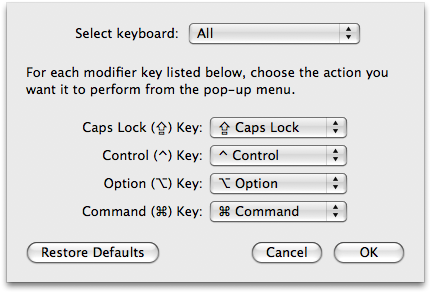 OS X thoughtfully allows you to change the mapping of Control, Option, and Command in the Keyboard and Mouse preferences panel, and even lets you set different customization for different keyboards. Lots of ex-Windows users use this to swap Command and Control with Control and Windows on a Windows keyboard, which harmonizes many familiar DOS/Windows command shortcuts. And if you’re as insane as some Apple fans users, you could also use this panel to move Caps Lock and Option back to their original locations.
But is it a good idea to mess with the keyboard settings like this? I think not. Eventually you will need to use a “correct” keyboard, whether you are using a Windows or OS X computer, and crutches like this just serve to frustrate your efforts to acclimatize. I think it’s best to simply live with it – to get used to using the right key combinations, no matter which input device or operating system one is using.
Of course, there’s one more problem for me. See that keyboard layout up at the top? My primary keyboard is, as I’ve mentioned, a 1987 IBM Model M. Despite possibly being the best keyboard ever made, it is a 101-key model, not the more modern 104-key Windows unit. I’ve gotten used to using Ctrl-Esc for the Windows key, and even Shift-F10 for the menu. But I’m having a real problem with OS X because I simply do not have a Command key, and no amount of “getting used to it” will change this fact. So for now I had to remap Control to Command, and I will have to live without a Control key in OS X. Anyone have a better idea?

Regarding the 101-key, rather than living without the Control, why not just remap Caps Lock to Control? Or alternatively remap Caps Lock to Command, and leave Control as Control. You’ll lose the Caps Lock key, but I think its worth sacrificing. I did something similar with my old Thinkpad T23 (mapped Caps Lock to the Windows key).
Personally, I use Unicomp’s Model M keyboards, which have a 104-key layout, and am pretty happy with them (though I don’t recommend their pointing stick model, their pointing stick just doesn’t match IBM’s). I don’t have access to any original IBM Model M’s to compare them to, though.
In the end, I actually did decide to leave control as control and use caps lock as option. Door number three?
Thank you!!!
Now I have remapped my command and alt
back to the right place, how I’M used to
them being.
Thank you sir.
Thank you!!!
Now I have remapped my command and alt
back to the right place, how I'M used to
them being.
Thank you sir.