January 28, 2012

iMac

Posts about the 2009 Apple iMac

Which Apple Devices Support 802.11n Wi-Fi?

Apple boasts that their AirPort Extreme base station is "5x faster" but which devices can connect?

It is nice to see Apple out in front with a technology like 802.11n, considering their reluctance to support Blu-Ray and USB 3.0. Although expensive, the AirPort Extreme and 2011 MacBook Pro and iMac sport top-of-the-line specs and high performance Wi-Fi. But the lack of 5 GHz support across the board means many users will stick to the crowded 2.4 GHz spectrum, limiting performance.

What Is Paired Storage?
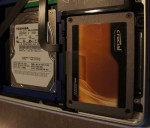
OWC sent me this DataDoubler, a key enabler of paired storage

Paired storage is a growing trend in the laptop computer market, with many high-end machines sporting both a SSD and hard disk drive. But it remains a game for the rich, adding many hundreds of dollars to the cost of a computer, and manually placing data is inefficient. It will be interesting to see if future operating systems bring better support for paired storage, and if it will reach into the server world.

Promise SANLink Thunderbolt Preview

The SANLink promises massive I/O performance, even on a laptop!

Although the SANLink appears to be something of an oddball, it indicates the shape of things to come. Thunderbolt will transform the use cases for portable and all-in-one computers, likely spelling the end of the empty boxes for desktop use. In fact, I would not be at all surprised if Apple soon canceled the Mac Pro line entirely in favor of a beefed up Mac Mini and iMac stable. And the dozen or so MacBook Pro users wanting to connect to a Fibre Channel SAN will finally have the opportunity to do so sometime later this year.

Will The First Thunderbolt Peripheral Be The iMac?

We have barely scratched the surface of that this little cable can do!

Apple and Intel introduced the impressive new Thunderbolt interconnect last month on the MacBook Pro line, but folks like me who bought one have nothing to connect to yet. It was exciting to see the wide variety of Thunderbolt peripherals on display at the NAB show in Las Vegas last week, but none of these will ship to end-users before the middle of the summer. But evidence is mounting that Apple will be the first out of the gate with a Thunderbolt peripheral, it just won’t be the sort of peripheral you might expect. I am hearing rumors that the new iMac, to be introduced this month, will be both a Thunderbolt host and peripheral in one! Read on for what this means in the real world.

How To Use Mac Photo Booth With No Flash or Delay

This is not exactly the photo I intended to take...

Among the useful features and applications bundled into Mac OS X, Photo Booth is not exactly the most useful. Still, it’s handy to sometimes have an application to snap a photo of yourself or your surroundings while on the go. But Photo Booth has no preferences pane, and the default delay and BRIGHT screen flash can ruin your picture. Here’s a quick tip on how to use Photo Both with either (or both) turned off!

Benchmarking the 2011 13″ Core i5 MacBook Pro

The new 13" MacBook Pro performance admirably

As I mentioned in my previous article, I decided to buy the 13″ Core i5 (base model) MacBook Pro. It meets my needs as a travel workstation, but how does it perform? I decided to benchmark it against my other Macs to see how it stands up.

ioSafe SoloPRO Review: Is It The Safest Place For Your Data?

The ioSafe SoloPRO protects your data from a house on fire. Seriously! That's really what it does!

It’s hard to stand out in the world of external storage devices, and doubly-hard to compete with the hard disk drive makers themselves. This hasn’t stopped folks like Iomega, Verbatim, and LaCie from trying to impress customers with flashy cases, software bundles, and clever functionality. But clever new twist on the external hard drive concept just rolled into the Pack Rat lair: The ioSafe SoloPRO is fireproof and waterproof. Cool!

Introducing SDXC and exFAT in Apple Mac OS X

Surprise! Mac OS X 10.6.4 in the mid-2010 iMac adds exFAT support!

SDXC and its partner, exFAT, are on the rise and gaining support in the latest digital cameras. New Sony models like my NEX-5 add SDXC support, as do new models from Canon, Nikon, and others. Photographers are mainly interested in the increased speed and capacity of these cards, but many will face a challenge when trying to use them in their Macintosh computers. Thankfully, it looks like Apple is moving just as rapidly to support SDXC and exFAT!

How To Add An eSATA Port To An Intel iMac

iMac-SuperDrive-sensor.jpg

My late-2009 27″ Intel iMac now has an eSATA port. I’m documenting how I did it here mainly for posterity. Although it works fine, I cannot recommend that others attempt to perform the same surgery on their own crazy-expensive Apple computers. eSATA mods like this won’t be satisfying to most users, and the operation is risky and destructive enough that non-crazy people shouldn’t attempt it!

Four Ways to Add eSATA to Your iMac

OWC locates the eSATA port in the speaker grille - possibly the only option!

The latest Intel iMac line is a killer desktop, from its brilliant screen to its excellent performance. But it’s a little lacking when it comes to expansion: A workstation really needs more I/O than five USB and one FireWire port! Since I’m a storage fanatic, my attention naturally turns toward eSATA, and I’m not the only one. Although I’ve come up with three different methods of adding eSATA to my iMac, I haven’t yet taken the plunge and made it happen.