Today I came up against a frustrating realization: Apache doesn’t have a satisfying way to redirect multiple domains to canonical hostnames! In other words, it’s fairly easy to redirect one domain’s content from “www.example.com” to just plain “example.com” or to make both hostnames work, but there’s no one-stop solution to do this with a dozen domains. I’ve hit on a method that correctly redirects alternate hostnames and will save you aggravation in the long run.
Archives for 2010
A High-Performance, Low-Memory Apache/PHP Virtual Private Server
I’ve previously written about my Multi-Server Web Hosting Environment and the how I Tuned Lighttpd For Linux to run as well as possible. But I’ve been having weird issues with that setup lately and was forced to rebuild the server entirely. While I was at it, I decided to give Apache another try, since the lighttpd hackery I needed to perform to get things like WP-SuperCache running were starting to get me down. The configuration documented here uses Ubuntu Lucid (10.04), Apache 2.2, FCGI, and PHP-CGI tuned for a 512 MB virtual private server (VPS) running on Rackspace Slicehost.
Walled Gardens, Gilded Cages, and Right to Repair

Things are getting awfully complicated, aren’t they? The custom parallel CPUs, proprietary communications networks, and encrypted data ports require extensive training, special tools, and a computerized reference library to comprehend, much less debug. And the manufacturers, who derive much of their money and differentiation from warranties and authorized repair centers, are loathe to see independent shops get a piece of the action.
Donate Your Swag to School Kids In Need

Trade shows are a veritable swag-fest, some with great loot and some with junk. I’ve been critical of the booth babe and chotchkie phenomenon, but my friend Kevin Houston has a better suggestion: Donate your (useful) swag like backpacks and pens to school kids in need.
How To Boot Snow Leopard in 64-Bit Mode
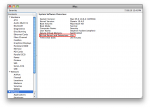
Last year, I posted two articles about Apple’s OS X 10.6 “Snow Leopard” and its new 64-bit kernel. The upshot was that, although just about every Mac made since mid-2008 is 64-bit capable, only the Xserve boots in 64-bit mode by default. Since my main computer is a glorious 27″ iMac that runs 64-bit Snow Leopard perfectly, I decided to permanently set it to boot this way. Here’s how you can set your Mac to boot 64-bit Snow Leopard, too!
