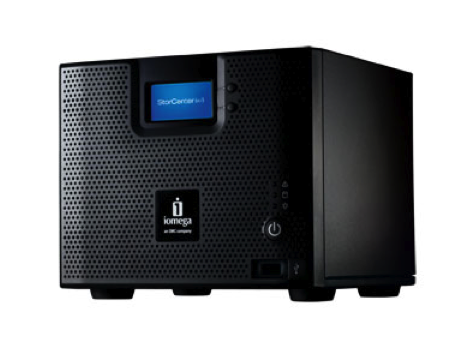
Iomega is well into its second coming as EMC’s entry-level storage division. First, they applied EMC’s compact and full-featured LifeLine home storage software to existing gear, giving birth to the Home Media Network Hard Drive, StorCenter ix2, and StorCenter Pro ix4-100. Then they wooed the small-business community with the rack-mount StorCenter ix4-200r, adding iSCSI target support and VMware compatibility.
Today, they are back with the new ix4-200d, probably Iomega’s best product yet. It includes every feature of the rack-mount ix4-200r, including NAS and iSCSI target mode plus great new stuff like one-touch synchronization. All of this is packaged in a Drobo-like desktop system with a starting list price of just $700, or less than half the cost of a comparable ix4-200r!
Desktop Storage
External desktop storage products, exemplified by Western Digital’s wildly successful My Book series, have been a huge retail hit. Priced just over $100, these drives pack a terabyte or more and offer plug and play simplicity. I recently visited a small business with a WD or Seagate USB enclosure on every single desk. I’ve purchased five USB- or FireWire-connected hard drives myself over the last two years!
But these single-drive desktop wonders are a disaster waiting to happen:
- They fail frequently (like my Maxtor 3200), instantly wiping out the data they contained
- They are targets for thieves, so data loss prevention (DLP) experts warn against their use
- They aren’t shareable natively, so most people resort to sneakernet swapping rather than fight with Windows to present them as a network share
- When they’re full, they’re full, forcing the purchase of a whole new drive
Many vendors sell grown-up versions that address some or all of these concerns with multiple drives, network connections, and encryption, but these have been slow to catch on. Since they contain redundant drives and extra hardware and software, they are much more expensive than their little cousins. Iomega has done battle in this arena with their original StorCenter ix2 and the ix4-100, but these have yet to catch on. Even Drobo, with their fanatical user-friendly focus, has failed to convince many buyers.
Then there is the world of business storage. Way down at the bottom of the enterprise storage pyramid lies the realm of small 4- and 8-drive storage arrays. These SMB storage arrays offer a lot of capacity and reliability for the money but very little in the way of features. Iomega’s StorCenter Pro ix4-200r, in contrast, wowed the techies with a full iSCSI target stack that was certified for VMware ESX. But the price, over $1500, definitely limited sales to the home hobbyist.
“Just Right” Storage
Although the name is similar to the StorCenter Pro ix4-200r launched this Spring, Iomega went back to the drawing board for the ix4-200d. They built an entirely new device that could offer the impressive features of their StorCenter Pro line at a price closer to consumer storage offerings. The result boasts everything the Pro has and more at less than half the price:
- You want connectivity? The ix4 sports dual gigabit Ethernet ports that can be teamed up for performance or split off for redundancy.
- You want NAS? The ix4 supports NFS, SMB, and even Apple’s AFP, plus it’s Active Directory compatible.
- How about iSCSI? It’s a full-featured iSCSI target, certified for Microsoft Server 2003 and 2008.
- Want to host virtual machines? The ix4 is certified with VMware ESX 4 vSphere using both NFS and iSCSI, on the Xen HCL, and that Microsoft logo means it will work with Hyper-V as well.
- Need backup? The ix4 comes with EMC’s Retrospect and supports OS X Time Machine over AFP just like an Apple Time Capsule.
- Looking for weird features? How about support for up to 5 Axis network cameras, BlueTooth Picture Transfer Protocol, and UPnP/DLNA media service!
- Iomega also added a new feature, QuickTransfer, to synchronize files between devices.
This is one seriously feature-rich storage system. In fact, this glut of features is the ix4’s Achilles heel: How do you effectively communicate the value of a device that does so much? Most of the buying public has never heard of most of these features, so the price remains hard for some to justify.
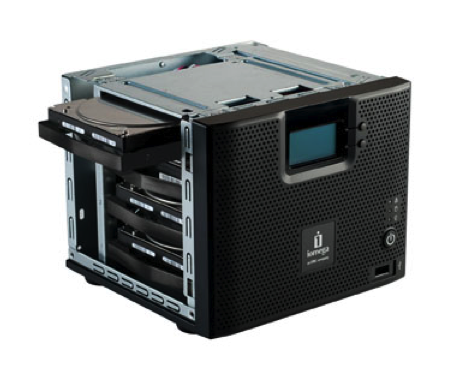
Another hurdle for the ix4 is Iomega’s decision to fill it with hard drives. One cannot buy an empty ix4-200d, and both the 2 TB and 4 TB configurations come loaded with four hard disk drives. This raises the price of entry and scares off the very techies who might be interested in the device. The majority of Drobos are purchased with no drives at all, and storage geeks like me love the idea that disks can be added as-needed in the future. Although Iomega is open to users swapping out the drives in their own StorCenter device, this is not its intended use case. Iomega’s decision to sell the ix4-200d as a loaded appliance seems counter to the price sensitivity and flexibility needs of buyers.
QuickTransfer: Data Synchronization for Everything
One nifty new feature included with the ix4-200d is QuickTransfer, a one-touch data synchronization capability. Leveraging rsync technology, but hiding this complexity with a more-friendly wizard-based GUI, QuickTransfer allows users to set up synchronization jobs between the ix4 and a variety of targets:
- USB drives can be plugged into one of the three USB 2.0 ports and synchronized with a subset of the content of the ix4. For example, a portable USB drive could be “recharged” with the latest set of data before one heads out of the office.
- Two Iomega ix4’s, or other NAS systems for that matter, can be synchronized over the Ethernet/IP LAN. This would provide a robust and bandwidth-friendly remote office backup or data replication solution.
- A PC or Mac can also be synchronized over a network share, providing a simple alternative to the bundled backup software.
QuickTransfer is exclusive to the ix4-200d for now, but Iomega assured me that it would be included in future StorCenter products and added to the StorCenter Pro ix4-200r in the near future. It is unknown if or when other existing StorCenter devices will get QuickTransfer, however.
Iomega’s Next Move
What will Iomega do next? They must be ready to announce their vSphere 4 and Microsoft Windows Server certification soon, since both company’s web sites already list the device in their compatibility lists. Iomega ought to try to take advantage of the interest among VMware users with a big VMworld splash. They will be there, but it is awfully hard to get noticed at such a large event. I am looking forward to the event to get a hands-on test.
The ix4 should begin showing up for sale at online stores very quickly. Amazon listed the rackmount product within days of its release, and we expect the same this time. But will Iomega offer this cheaper device in retail stores? It would be great to have it available at Staples and Best Buy, but shelf space for a storage system this expensive would be hard to get. Instead, expect it at specialty outlets like Fry’s and perhaps Micro Center.
How much does the StorCenter ix4-200d cost?
- The 2 TB model (SKU# 34546 with four 500 GB drives) lists at $699.99
- The 4 TB model (SKU# 34549 with four 1 TB drives) lists at $899.99
- The 8 TB model (SKU# 34563 with four 2 TB drives) lists at $1,899.99
It also seems likely that the 2-bay product is up for a refresh in the near future. The ix2 can’t be said to be very attractive, so hopefully the company will do something about this with the next-generation product. It is unclear whether the inexpensive 2-bay device will get iSCSI support, but I suspect it will. Beyond this, might Iomega move further upmarket with an 8-drive unit? We shall see!

This is just jaw-dropping. Sold. I’m buying one the minute they come out. This solves so many problems for me, it’s not even funny. Microsoft’s Windows Home Server just lost all appeal for me.
What about the noise ? Can we put it on a desk in an open space?
What’s the best way to connect a laptop ? Windows 7 include an ISCI connector, is it more efficient than SMB ?
Are there any performance numbers available?
what is the power consumtion on one of these?
(measured in real world conditions, not just quoted from their spec sheet)
I would love one, but wonder what UK price will be …
Dave
The features look very good on this for home use. I’d even consider one myself. It’d likely be a good fit for SOHO as well. The SMB
space and hosting VMware? Now that’s, a stretch. Let’s see… If I used the highest performance RAID config (RAID 10) and assumed a 1:1 random R/W ratio you max out at 120 IOPS with 4 drives. As in Chad’s tweet, “point is valid – this will be for tiny, not performant-centric use cases.” I could see an individual or hobbyist playing with VMware on this, but running virtualized apps for my business? Don’t think so.
John F – FYI, just so everyone knows, this is not the beginning (there have been earlier models), nor the end (there will be more – both smaller/cheaper, and larger/faster) of what iomega is doing down this front.
I think it’s criminal in VMware use cases to focus on capacity alone (man, a LOT of customer could run a lot in 8TB), and not think about the performance considerations.
With thin provisioning, dedupe, 2TB drives all becoming mainstream – this is actually a bigger issue than people think – capacity is now RARELY the gating factor on storage – all all market segments.
BUT – will be doing some testing when VMworld is done, and will post the results…
I think a SAS version, if it’s in the cards, would go a long way to providing the performance level needed for small business to virtualize anything other than the occasional one-off tiny, non-performance centric application. I’d hate to see an otherwise good product get a bad rap from overly aggressive marketing.
I’ll be looking forward to seeing those performance numbers.
John
Why do you think SAS will be so important for small businesses?
Surely they all have multiple GbE ports in their servers these days, and the cabling infrastructure is in place. Further, 10GbE is bearing down on us.
SAS on the other hand is a whole new ballgame. New cables, a SAS controller in the server and so forth. Do you really see small businesses undertaking that?
Hi Richard,
In the low end of the market where you don’t have large cache or sophisticated ASICs to improve performance, it comes down to IOPS/spindle. Talking about support for SAS drives in the device, not SAS interface to the server. With 4 SATA spindles, you’ll smack into a disk IOPS bottleneck long before you would saturate the bandwidth of 1Ge.
John
If you’ll be at VMworld, I’ve been told there will be a raffle and special discount on the ix4-200d!
I’ll try to bang on the thing when I get hands-on later this week. It can’t be slower than the Drobo!
I really don’t think we will see a SAS (or eSATA) version of these arrays. They’re not intended for maximum performance but for maximum capability and flexibility. block + file in a little desktop array is just awesome!
I don’t know. It’s a rapidly evolving market. Not talking bleeding edge 15K drives here. A 7.2K SAS drive still has enough umph to potentially get there. Right after my response to RIchard I did a quick search….
1 TB SATA Barracuda ES.2 will get you about 40 random IOPS/Spindle @20 ms at $169 retail
http://www.pcconnection.com/IPA/Shop/Product/Detail.htm?sku=7776573
1 TB SAS Barracuda ES.2 will get you about 90 random IOPS/Spindle @20ms at $219 retail.
http://www.pcconnection.com/IPA/Shop/Product/Detail.htm?sku=8359229
The premium for the interface on the drive isn’t proportional to performance improvement, and it isn’t that much. We’ll have to wait and see how it plays out.
John
What do you consider a large cache?
You missed one of the biggest things for me. It replicates with a celerra!!!!
http://storagezilla.typepad.com/storagezilla/2009/08/ix4-200d-replicates-to-ns-960-and-beyond.html
It replicates with ANYthing, including a Celerra. See point #2 under QuickTransfer.
I’d like to see a comparison between Iomega’s device and FreeNAS… As far as I can see, there’s nothing Iomega can do that FreeNAS can’t. Performance ought to be the differentiator…
Benoit,
I have an IX2-200d on my desk here in the office and don’t even know it is running. Very quiet! Best way to connect a laptop is via a drive letter mapping via network unless you need block level access which I do not forsee from a laptop.
Hope this information is helpful.
Maurie
Iomega engineering reports performance in the 180mbps – 240mbps range using a popular benchmarking utility. I suggest looking at SmallNetBuilder.com to see if they have done testing yet. They compair with other popular NAS products on the market.
UK pricing appears interesting. Its cheaper to buy a 2TB unit, toss out the 500GB drives and replace all of them with 1.5TB drives than it is to buy a 4TB unit. Why do manufacturers insist of shafting people so hard to get an upgraded version?
This is the same with US pricing. The 8 TB version is crazy expensive, and even the 4 TB one isn’t competitive with a self-upgrade. BUT YOU CAN’T. I talked to the Iomega people at VMworld and they confirmed that there is no current upgrade path for these things. You’re stuck with the drives you buy. Although you can unscrew the case (with thumbscrews!) and remove the drives, you cannot install larger drives at this point.
[via lwn]
I wouldn’t buy anything from iomega — they were losers with ZIP (which I owned too), its ancestors, and they were *ugly* a company to deal with as for a NAS software developer. There seems to have been left no techie inside by 2003, and managers would press then cancel on pretty solid Linux-based NAS to hit the developer company pretty bad.
If you’re a day-job software developer or manager, you know what it is when a company promises a breakthrough contract, then wears you down, then refuses to pay money for the job done and product delivered.
Umm by my math its better:..
40 IOPS for $169 or $4.23 per IOPS 90 IOPS for $219 or $2.43 per IOPS
Stephen, are you sure you cannot upgrade disks? Is the underneath OS customized for each box and hardened to avoid user changing disks?
To my knowledge, Iomega uses customized versions of BusyBox (a linux variant).
I mean, I certainly have to go through a complete format (thus loosing content) but swapping disks with bigger ones shouldn’t be impossible.
Or, do you mean that, by doing this, you break warranty support?
To be clear, busybox is not a variant of Linux (either the kernel or a distro), it is a shell (replacement for bash) that is useful for embedded Linux because it cuts down on the space needed in flash for copies of all the commands supported by busybox (and duplicate copies of library routines or shared libraries etc).
The ix4-200d device indeed is Windows 2008 certified.
But that doesn’t mean it is usable as cluster shared storage in a hyper-v environment.
It seems that ix-4-200d does not support scsi-3 persistent reservation (SPC-3). The hyper-v cluster validation fails on this item.
Iomega support confirmed me that they doe not support scsi-3 persistent reservation.
I have used the ix4 since August and have had no issues with it..the Gigabit ports are what drove me to the product…I can say that for NAS the product was outstanding and I thought the price was inline with the market if you are looking for something about quick plug and play USB…its great for a small business owner like us.
What is about the transfer rate over Ethernet?? I getting with the device here about between 15-20mb/s that is not even 6%. This device is soooooooooooooooooooooooo slow, my external HD was faster.
I have 2 device and use one to backup the other one and at 700Gb it runs now more than 115hrs and is still at 60% transfered.
If i only think that i would have the device fully loaded……. 1 week for a sync???
And you give this nice review??? Shame, Shame……
I’ve been running performance tests on the ix4-200d review unit Iomega sent me and have not seen the best performance. I’ve never broken 30 MB/s using iSCSI, SMB, or QuickTransfer. Iomega insists this is too low and I should be getting better performance, and sent some suggestions. However I have not yet been able to try these out since I haven’t been home much!
I've been running performance tests on the ix4-200d review unit Iomega sent me and have not seen the best performance. I've never broken 30 MB/s using iSCSI, SMB, or QuickTransfer. Iomega insists this is too low and I should be getting better performance, and sent some suggestions. However I have not yet been able to try these out since I haven't been home much!
@cgeerinckx
To bad. Thought it would be great for my homelab.
Want to test hyper-v cluster.
Wich NAS device is compatible with hyper-v (cluster)?????
Stephen, did you keep the box? I ended up picking up a 4tb as the price finally dropped low enough that I just couldn't say no.
Interested to see if you have done anything major with it. My home lab is finally getting some real functionality. Worth the money in my book so far!
For anyone considering running the ix2 or ix4 series in a production environment, DO NOT DO IT. The Iomega software (by their own admission) is very buggy through firmware version 2.1.25.229. In my case, the unit freezes & stops responding from 1m-15m after boot. Sure, the data is still there (no drive errors) and Iomega knows it’s their problem. They’ll send a replacement unit, but you’ll be SOL when it comes to getting your latest data back.
For anyone considering running the ix2 or ix4 series in a production environment, DO NOT DO IT. The Iomega software (by their own admission) is very buggy through firmware version 2.1.25.229. In my case, the unit freezes & stops responding from 1m-15m after boot. Sure, the data is still there (no drive errors) and Iomega knows it’s their problem. They’ll send a replacement unit, but you’ll be SOL when it comes to getting your latest data back.
I’ve read some post here about upgrading the hd of an ix4-200, but the thread has somewhat aborted on that.
We got the 4Gb one (4*1Gb), works well for what we need, but it’s filling faster than planned, so we must look for an upgrade. I thought about replacing the current drives with a new set of 2Tb drives, but the unit becomes unavailable, just flashing front and network lights and display, and looks sort of hanged on that. Tried the question at Iomega but they seem to just want to sell a new unit, point is that upgrading the current one would cost us less than half of it.
My question: has anybody done the hd upgrade or could offer any hint about it?
If that’s not possible, guess we’ll drop Iomega, as in the long run (not very long these days actually) it would become useless and just expensive.
TIA for any answer.
that was meant to be 4Tb (4*1Tb)… sorry
that was meant to be 4Tb (4*1Tb)… sorry
I’ve been told that you can swap all your disks at once and replace them with bigger ones. the (long) process will rebuild everything. i plan to buy 4x2TB Seagate Barracuda LP disks (5900 RPM, 32MB cache) and test this.
consider that if you enable the support mode (SSH), you can backup the current configuration and restore it in the new array … i have to test it tho
of course the warranty is void at that point
Have you replaced all 4 drives & tried to do this? I had the same thought–and bought 4 of the same Seagate 2TB drives (140each) but just got the unit today–and haven’t tried to swap drives.
? when removing the old drives, just remember where they go if you need to replace them? Would that be a simple fix if the larger drives didn’t work?
Guess I do not feel confident enough to deal with the undocumented support mode, and not because of warranty.
Anyway eventually I got the ix4-200d working with 2TB drives. In a word, start with the original drive set, change one drive at a time, and let it install it. When you got all the four in the unit, to recover the full size of the new set, just erase them and let it rebuild the array, a long and time consuming job, but it works no problem. Do not forget of course to make a backup of your data, if any, before starting the process.
It would have been much simpler if Iomega provided, say, a cd, to initialise the hd, i.e. copy the system partition and files to it.
These NAS units are good, but trying to look proprietary by keeping all info from users IMO is not good marketing. I understand they want to keep their business on support and spare drives, but this wouldn’t change if they set for an open system, it’s a different marketing approach of course but my guess is that these units would sell like hot cakes, making both users and Iomega happy.
Competition do already know this … 🙂
I appreciate the directions to replace 1 drive at a time–man that takes a while–
How do you “just erase them and let it rebuild the array” after replacing the 4th drive? Is is as simple as simply going the the drive & removing folders, or how to set up the new array?
Thanks!
Load the web interface and go to settings->disks->manage->erase. Then, assuming a data protection is on, plan an extended weekend holiday and enjoy it.
Btw, a shortcut when replacing the drives, used it on a second unit, is to switch to a no_protection scheme before starting the replacing process. This makes the install time of each disk a matter of minutes or so, as it has no data protection to rebuild. When you’re done, first erase and then go back to the protection setting of your choice … holiday time applies of course.
Worked for me.
So, the after all is said and done, you CAN repalce the 500Gb drives with 2Tb drives and make the thing work? I’m just about to build a VM lab and was hoping to use this, but the 4/8 TB boxes seem just a little on the high $ side, and putting 2Tb drives in seemed like a good idea, but there seems to be a lot of negative discussion on being able to do it. This is the first mention of sucess I’ve seen.
Can confirm that this process works. Took ages and ages, and as the drives were my own supply, not officially Iomega I realise the warranty is void.
Didnt need to do any manual intervention at all on the device, just replaced each disk one by one, letting the auto rebuild of data protection happen each time.
Tip: Set the email parameters up first, that way it emails you when it is done each stage, and you dont need to monitor it.
I got mine delivered 3 weeks ago but one drive was a dud. I have spent the last 3 weeks trying to get support – in this case a replacement drive. 14 emails and support chats later and no one can help me. I bought online so am truly screwed. Don’t make my mistake
Yes – I had a similar problem. It seems anything bought online is simply not supported. So I have a 5.7TB non RAID unit because I received it with a dud drive. What sort of comeback does one have when sold a dud online like this? DO NOT BUY FROM IOMEGA, THEIR SUPPORT IS NON_EXISTANT.
To upgrade the drives in these, change the protection mode to JBOD, let it do its thing, shut the unit down, remove all 4 drives, replace all four drives with bigger. After booting again you will then be able to change it to RAID 5 or RAID 10 without issue. This process is MUCH faster than replacing one drive at a time with a bigger one, waiting for rebuild and then basically wiping it all in the end. Because in JBOD mode it really sees each drive individually rather than as a raid group so mass replace is simple. We buy these with the 4 x 500’s and instantly upgrade them to 4 x 2TB before putting them into use.
I had iomega NAS storecenter IX4 100 and it is giving me always trouble.
This product is not good with my experience.
system totally locked and have to do many times reset.
i dont recommend this to anyone.
Thanks
Bikash
Drop Hyper-V and go for vmWare !!!