November 2007

Why I Like Drobo

There has been lots of talk about the Data Robotics (aka Drobo) SOHO “storage robot”
- whoever they have doing their marketing deserves a raise! When I first heard about it, I was pretty puzzled - Why care about yet another storage enclosure, especially an overly expensive one that doesn’t even have NAS features? On closer examination, I have become a believer in the potential of the device and the company. Drobo offers some key ingredients that promise future success to me: a clear focus on usability, novel thinking to solve a real-world problem, and that great marketing I mentioned earlier. Click through for the full story… Continue Reading »

Share this post:
  • Digg
  • del.icio.us
  • StumbleUpon
  • Technorati
  • Reddit
  • Google
  • Slashdot
  • Facebook
  • Pownce

Enterprise storage
Terabyte home

Comments (2)

Permalink

Terabytes on the Cheap

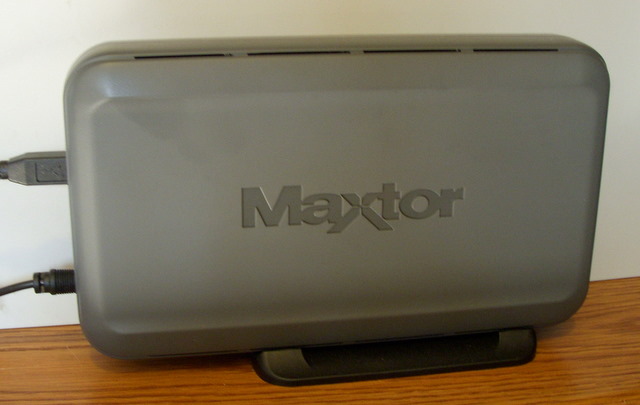
Maxtor Personal Storage 3200Meet the Maxtor Personal Storage 3200. It’s a cheap, quick, and dirty way to add storage to your PC, and it’s ilk is becoming the surprise hit of the holiday season, lifting the stock of Seagate and Western Digital, and making Hitachi, LaCie and others fight for a piece of the market.

I’ve bought two 3200’s and a Western Digital MyBook (500 GB each) over the last 9 months, adding 1.5 TB to my home environment without opening a computer case or spending a fortune. The MyBook (which has eSATA) is connected to the Series 3 TiVo, one of the 3200’s is connected to my NSLU2 for home server duty, and the other is doing backup duty.

And, yeah, the most recent 3200 had that Chinese virus problem, but Avira’s AntiVir blocked it and a quick reformat wiped it clean… It’s kind of amusing to be personally affected by a tech meme, isn’t it?

With the advent of “quick enough” USB 2.0 and blazing fast eSATA, I wouldn’t be surprised if these external drives change the face of the PC. I already know of a few folks who have switched to the Mac Mini and are hanging these drives outside instead of buying a big empty case to house internal storage. And the laptop market is booming, threatening to replace the traditional desktop PC. Perhaps the idea of a Lego brick PC wasn’t a bad one after all - it was just waiting for USB to ramp up the speed…

Share this post:
  • Digg
  • del.icio.us
  • StumbleUpon
  • Technorati
  • Reddit
  • Google
  • Slashdot
  • Facebook
  • Pownce

Personal
Terabyte home

Comments (1)

Permalink

Optimus Maximus: It’s Beyond This Keyboard-Head
Have you heard of the Optimus Maximus yet? It’s the ultimate computer keyboard (no kidding!), it costs $1500 (no, really, I’m serious!), and I’m not interested (even though I’m a keyboard nut).

First, an introduction to the Maximus: It’s a 113-key PC keyboard. But each key is actually a mini OLED display, so the user can apply custom labels on the fly based on what application is in use. This is fairly cool - the (Photoshopped) demo pictures show a specialized Quake layout and talk about Hiragana and even Quenya (for all you Elves in the house!).

So imagine a massive keyboard (most common ‘boards have 101 to 105 keys) with glowing, possibly animated, keys. One that has to be plugged into its own power supply because no USB port could handle the load. One where the layout might just change on you when you alt-tab (or command-tab - Mac OS X works, too) over to another application. One that cost you more than many desktop PCs.

Having a hard time imagining it? Well, you’ll have to because even though it’s been the geeky fanboy’s dream since 2005, it’s still not shipping. Wait ’till February, they say! In the mean time, you can get a fairly cool 3-key version (is something with just three keys really a keyboard?!?) called the Mini Three for just $150! And as if one vaporware keyboard wasn’t enough, the Optimus people just announced variants with 47, 10, and one (One?!? The space bar?!?) programmable key for the cost of a sweet hi-def digicam, a full-price TiVo Series 3, or an iPhone (plus tax)! And they’re all shipping in February! Really! Here, look at the box!

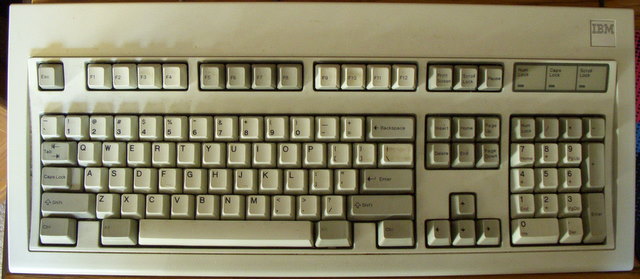
This is madness. I love keyboards, but this thing is not a keyboard. It’s a multi-display peripheral that also has keys - which is why the Mini Three is fairly cool.IBM Model M

Me? I’ll stick to my beloved 1987 IBM Model M - a keyboard that has served me for nearly two decades, attached to a dozen different PCs. A keyboard that people can truly wax enthusiastic for, since it’s a keyboard not some multi-display monstrosity. A keyboard that you can type 90 words per minute on. A keyboard that can handle a coffee spill. A keyboard that makes people on the other end of conference calls say “what is that noise?” A keyboard you can still buy (new old stock) for under $100!

Though I do miss the programmability of the Gateway AnyKey sometimes…

Share this post:
  • Digg
  • del.icio.us
  • StumbleUpon
  • Technorati
  • Reddit
  • Google
  • Slashdot
  • Facebook
  • Pownce

Computer history
Personal
Terabyte home

Comments (3)

Permalink

Import your old Outlook/Express PSTs to Gmail

Like so many other people, I’ve switched my personal email use over to Gmail. In fact, I did it back in mid-2005, redirecting my personal address on my private fosketts.net domain from Dreamhost’s POP mail service to my gmail account. I’ve been happy with it ever since, but my old mail still sat on my old desktop PC in a PST file created by Microsoft Outlook.

I love that Gmail keeps all of my email online and easily searchable - when I need to locate some old bit of information, I can usually find it by typing a couple of words into the Gmail search box, no matter where I am. Since I travel a lot, I’ll often log into Gmail from my work laptop, a hotel PC, or my iPhone just for this purpose.

But the other day, I remembered a message my dad sent me a few years ago and wanted to look it up. I was stuck, though, because the message was sitting in a PST on my (powered-off) desktop back at home. I was able to get to it from my laptop through a complicated process that involved ssh, my Tomato-powered router, wake-on-LAN, and remote desktop… Not something I wanted to go through again!

I got thinking that I’d love to have all of my mail in Gmail - even those messages from before I started using it. Turns out, lots of people were thinking about this way back when, but it’s always been difficult to import mail into Gmail, and lots of folks think it still is. But I found that, thanks to Gmail’s new IMAP feature, it’s now super easy to get your PST (and Thunderbird, etc) mail into Gmail! Read on for how I did it, and how you can too!

Continue Reading »

Share this post:
  • Digg
  • del.icio.us
  • StumbleUpon
  • Technorati
  • Reddit
  • Google
  • Slashdot
  • Facebook
  • Pownce

Personal
Terabyte home

Comments (3)

Permalink

Toot toot: iSCSI and Fibre Channel Integration

Another week, another excellent TechTarget tech tutorial by my buddy, Stephen Bigelow. This time it’s on iSCSI and Fibre Channel Integration, and once again that Stephen Foskett guy is quoted. What a smarty-pants! ;-)

Share this post:
  • Digg
  • del.icio.us
  • StumbleUpon
  • Technorati
  • Reddit
  • Google
  • Slashdot
  • Facebook
  • Pownce

Enterprise storage
Personal

Comments (0)

Permalink

Another Roku Soundbridge

So I loved the original Roku Soundbridge I bought for the main stereo so much that I couldn’t resist buying a second one when I spotted it on clearance at Best Buy. Now I’ve got one in my office, too.

I wonder why they decided to clear it out. It was brand new, and had never appeared on their shelves that I noticed. It couldn’t have been displayed for more than a month or two since it was the new 1001 model. Oh well, their loss, my gain!

I’ve also monkeyed with my media server. I was running Unslung as my OS on the NSLU2, but I got sick of its weirdness, and it kept running out of memory. So I wiped it and went for SlugOS/BE (aka OpenSlug), a very trimmed down OS for the Slug. The Firefly Media Server people don’t officially support it, but I was able to get it running in short order. It seems much more stable and responsive. And I replaced the old Linksys build of Samba with version 3, which is much speedier and uses far less CPU time. I’m happy!

As an aside, did you know that Best Buy will haggle on their clearance items? Ask the manager, and they can easily knock off 15% to 25% from the yellow-sticker price!

Share this post:
  • Digg
  • del.icio.us
  • StumbleUpon
  • Technorati
  • Reddit
  • Google
  • Slashdot
  • Facebook
  • Pownce

Personal
Terabyte home

Comments (2)

Permalink