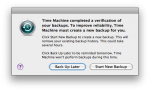
Time Machine is one of my favorite Mac OS X features but Apple recently rolled out a “Time Capsule Backup Update”, and included it in Mac OS X 10.6.4, that is causing confusion and concern. In the name of improving “the reliability of your Time Capsule backup,” this update has the unfortunate side-effect of detecting errors in existing backup bundles and forcing users to start a new backup. It happened with two of my Macs so far, so I was keen to find out what’s going on.
Everything
Dear Dell: Why Is It So Hard To Buy From You?

This love letter goes out to Dell. I hope they’re listening, because I want them to succeed and thrive and sell millions of computers. But they’re sure making it hard for me to buy just one. Here’s my story.
A VMware Hypervisor For Networkers?
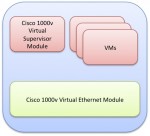
As my friend Stu Miniman pointed out, a recent VMware video suggests the company is about to jump into networking in a big way. This new offering would be a generic hypervisor for virtual network devices, from load balancers to security appliances, and would presumably be integrated with the existing vNetwork Distributed Switch functionality. This appears to be more than just a generic version of what Cisco already uses for their Nexus 1000V!
How To Assign Keyboard Shortcuts To AppleScript and Automator Actions
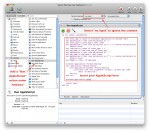
Last week, I posted a piece about How To Automate “Get/Send Clipboard†in Mac OS X Screen Sharing. In that article, I advocated using the Mac’s Speech Recognition to launch the AppleScript commands from any application (except Screen Sharing itself). But what if you don’t want to talk to your computer? Here’s a method of launching AppleScript or any other Automator action using keyboard shortcuts regardless of what application you are currently in. And it uses no third-party software, a bit plus as far as I’m concerned!
How To Automate “Get/Send Clipboard” in Mac OS X Screen Sharing
I’m a heavy user of Screen Sharing in Mac OS X. When I’m in the office, I sit at a workstation with my trusty IBM Model M keyboard, 27″ iMac, Microsoft Wheel Mouse Optical and Apple Magic Trackpad. Off to the side is my mobile environment, the MacBook Pro, open and running, with its display mirrored in a Screen Sharing window on the iMac. At the desk, I do most of my work on the iMac, with the MacBook limited to less-portable applications (Mail, iTunes, and iPhoto) and often displaying a full-screen TweetDeck board. But copying and pasting content between these two environments was a serious multi-click pain until I automated it with AppleScript and Speech. Here’s how I did it.
