I simply cannot recommend any Eye-Fi card, even the fancy new X2 line, to average camera users. Even enthusiasts like me would be wise to curb their enthusiasm. Most features barely work in practice, and the device frequently failed to perform.
Apple
What Are The True Eye-Fi X2 802.11n Wi-Fi Capabilities?
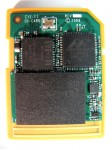
Eye-Fi (the company) would rather that we focus on the capabilities of their card rather than its technical components. But any self-respecting geek is going to want to know what makes it tick! I’d rather not cut open my card to get a peek at the chips inside, but Eye-Fi released some official details about the components used in the X2 series of cards, and a quick Google search revealed all that I needed to know.
Not All 802.11n Networks Are Alike
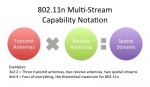
Buyers of 802.11n wireless network equipment should not assume they will see a great benefit right out of the box. Most will have to enable by hand a high-performance configuration including wide channels and 5 GHz operation. And some client devices may never reach the levels of performance expected by consumers due to hardware limitations.
Introducing the Eye-Fi X2 Card

One reason the smartphones like the iPhone are gaining ground on purpose-built cameras is their instant connectivity: Take a photo and you can immediately share it on Twitter, Flickr, Facebook, or other popular sites. Wouldn’t it be great if your SLR or digital camera could do the same? This is the promise of the Eye-Fi card: It adds Wi-Fi connectivity to most popular cameras, enabling you to transfer photos directly to your laptop or the Internet. If only it worked.
How Apple iCloud Will Challenge the Storage Status Quo

iCloud is a key enabler of the “post-PC” experience for iOS users. It supports wireless daily backup, storage of purchased music, apps, and books, and synchronization. It also has some interesting Mac OS X features, and it’s free. But the most-compelling feature of iCloud is what it means to future applications on iDevices, the Mac, and even Windows!
