
My next step was to resize my existing drive to make room for a new logical volume. CoreStorage can resize a drive non-destructively, moving existing data aside and clearing capacity for other uses.
Apple
Non-Destructively Convert an Existing Drive to CoreStorage
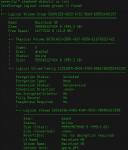
The first step to storage bliss is conversion: Mac OS X can non-destructively convert an existing drive to CoreStorage! From there you’re free to resize it, create new volumes, and pretty much anything else you’re interested in doing to your drives!
Fun Mac OS X Storage Tricks with CoreStorage
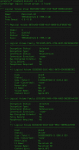
Mac OS X 10.7 “Lion” added a volume manager called CoreStorage, a development I was gleeful to report last year. But what can you do with CoreStorage? Here are some examples.
Mac App Store Error: “You have updates available for other accounts”
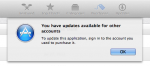
This has got to be one of the most misleading error messages in Mac OS X: Open software update, try to update an app, and get the message,”you have updates available for other accounts”. This message does not mean what it says, but I found a way to fix it when it appeared on my iMac!
Connect Your AppleTV to Any VGA Projector or Monitor with the Kanex ATV Pro
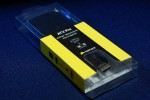
I love my Apple TV, but hate that it’s HDMI-only. That’s why I’m so enthusiastic about the Kanex ATV PRO, a self-contained HDMI-to-VGA converter that does it all, connecting any modern HDMI video source to VGA!
