
August 2008

An Ode to Visual Voicemail

You've got voicemail!

You've got voicemail!

This is part of an ongoing series of longer articles I will be posting every Sunday as part of an experiment in offering more in-depth content.

I have long felt that voicemail was archaic.  Like fax machines, voice mail systems seem stuck in an earlier era, with arcane controls and so little feedback that the user has no idea if their attempt at communication has been successful.  In fact, I was long loath to trust voice mail systems at all, instead just asking people to call my other numbers or email me.

With this in mind, I was impressed by Apple’s reinvention of voice mail with the iPhone.  Although the Visual Voicemail feature is widely recognized as referring to the interactive table of voice messages shown in the phone, their implementation goes well beyond that, offering all I wanted in a voice mail system.  Indeed, although I was considering other systems prior to getting the iPhone, I have since settled on Apple’s simple but effective system.

Continue Reading »

Share this post:
  • Digg
  • del.icio.us
  • StumbleUpon
  • Technorati
  • Reddit
  • Google
  • Slashdot
  • Facebook
  • Pownce

Apple
Personal
Terabyte home

Comments

Permalink

Microsoft Working to Improve Windows 7 Boot Times

Confirming my observation of longish Windows boot times, Microsoft engineer Michael Fortin today blogged about the booting improvements scheduled for Windows 7.

He rightly points out that there are really three different “boot times” to consider:

  1. Boot
  2. Resume from sleep
  3. Resume from hibernate

Note that the Microsoft definition of “boot (1)” only gets us through desktop launch and background task execution. It does not include my number one boot annoyance, namely “what the heck is Windows doing for two minutes after booting that makes it still totally unusable?!?”

According to Microsoft’s analysis, my “boot (1)” time of 80 seconds is longish, but within the standard deviation from the mean of 30-40 seconds. I’m glad, though, that Microsoft is working on this, and doubly glad that they recognize the “other perceptions that users deem as reflecting boot time, such as when the disk stops, when their apps are fully responsive, or when the start menu and desktop can be used.”

And I’m glad they’re considering resume time, too - this morning it took my PC 16 minutes to be usable after I woke it up! Seriously - there’s the desktop, now let’s listen to the disk chug and get nothing done for over a quarter of an hour at the start of my day! While waiting, I turned on the Mac and read my mail in Entourage - not exactly the outcome Microsoft would have wanted, I bet. Here’s hoping Windows 7 brings the improvements that Mr. Fortin is clearly working on!

Share this post:
  • Digg
  • del.icio.us
  • StumbleUpon
  • Technorati
  • Reddit
  • Google
  • Slashdot
  • Facebook
  • Pownce

Terabyte home

Comments

Permalink

Grapples and Tangelos: Why it’s Impossible to Compare Fairly

I get the same questions all the time: Should I buy X or Y? Is Z better than Q? But as much as it sounds like a cop-out, I always answer, “well, this sounds like a cop-out, but that depends on what you’re doing with it…”

Now EMC’s Chuck Hollis has (bravely) stuck his neck out to try to actually compare the capacity efficiency three storage arrays in a realistic way. Good luck, Chuck! I can hear the knives sharpening over at NetApp and HP already!

Continue Reading »

Share this post:
  • Digg
  • del.icio.us
  • StumbleUpon
  • Technorati
  • Reddit
  • Google
  • Slashdot
  • Facebook
  • Pownce

Enterprise storage

Comments

Permalink

Xen 3.3 Update Brings Paravirtualized SCSI
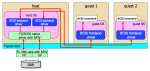
One of the new features in Xen 3.3, released this week, caught my eye: Paravirtualized SCSI (PVSCSI), which allows a guest OS to directly interact with a SCSI (or Fibre Channel) HBA. This should allow more specialized applications to be virtualized in Xen environments that use SCSI or FC storage without requiring the addition of a dedicated physical storage port per guest.


PVSCSI gives virtual machines direct access to SCSI and FC HBAs, and plays nicely with NPIV (Xensummit diagram by Fujitsu)

PVSCSI gives virtual machines direct access to SCSI and FC HBAs, and plays nicely with NPIV (Xensummit diagram by Fujitsu)

Functionally similar to VMware’s Physical Compatibility Mode for Raw Device Mode (RDM) volumes, PVSCSI enables certain applications that require direct SCSI communication to function in a virtual environment. Examples include Oracle RMAN, backup applications, and potentially SAN management software.

PVSCSI plays nicely with N_Port ID Virtualization (NPIV), too, so you don’t need to assign a physical HBA port to each guest - they can all share a port or two, and each would have his own N_Port on the Fibre Channel fabric.

In their Xensummit presentation about PVSCSI, Fujitsu showed impressive performance numbers, demonstrating that the technology doesn’t cause much of a performance hit even though it is substantially more complicated than the alternative approaches. I do wonder how PVSCSI managed to outperform Dom0 with 128k writes, but let’s chalk that up to insignificant variations in timing…

Now if only Xen would update the (3.2-era) readme files on their download page!

Share this post:
  • Digg
  • del.icio.us
  • StumbleUpon
  • Technorati
  • Reddit
  • Google
  • Slashdot
  • Facebook
  • Pownce

Enterprise storage
Virtual Storage

Comments

Permalink

Custom Drive Icons in Mac OS X

This makes it much easier to understand which drive it which!

This makes it much easier to see which drive is which!

I previously wrote about the benefits of custom drive icons, which can help you to keep your removable and internal drives straight, and how to create them on Windows Vista. Well, Mac OS X surprised me by using the same generic icon for every drive, so I set about figuring out how to customize them here, too.

It turns out it’s not only simple to do, but illustrates an odd way in which Apple implemented their split resource/data fork filesystem idea in a GUI. This exercise taught me a lot - what an ICNS file is, how Apple stores drive icons, what a droplet is, and how to use GIMP on a Mac.

This is part 1 - where I’ll go over the basics. Part 2 covers custom Boot Camp drive icons and other troubles.

Continue Reading »

Share this post:
  • Digg
  • del.icio.us
  • StumbleUpon
  • Technorati
  • Reddit
  • Google
  • Slashdot
  • Facebook
  • Pownce

Apple
Terabyte home

Comments

Permalink

American Airlines Points Gun At Foot

Translation: American Airlines doesn't want my business

Translation: American Airlines does not want my business anymore

I once enthused about my favorite travel sites, and among these was Kayak.com, the AJAX-y Web 2.0 travel search engine that I use to find flights. The thing I love about Kayak is that I can literally slide the dials to look for just the right departure time, connections, and even planes to make sure things work out.

But American Airlines recently decided that it didn’t like paying Kayak for referrals, and has apparently pulled its listings, even through third parties like Orbitz. Now, Southwest never included listings on Kayak, but that was no great loss to me. But I’m an American elite (Gold) and they were my strong number two airline choice. I was even thinking of shifting more business their way! But thanks to their spat over a few dollars of commission, they’re unlikely to get much more business from me.

The ironic thing is, I never used Kayak for bookings anyway! I always shifted over to my page at aa.com to buy the tickets, since it ensured that I got the right flight, codes, and instructions. So they never lost a dollar of my business to Kayak.

US Airways is becoming the Ryanair of the US!

US Airways is becoming the Ryanair of the US!

Air travel really is getting rapidly worse. The other day I was forced to fly cross country on US Airways, and it was just depressing. The flight attendants had to pitch credit card applications over the PA and in the aisles, they charged $2 for a bottle of water or cup of coffee, and there were ads on the tray tables. Oh, and US Airways doesn’t do planeside check - they require you to check your bags through (and pay a hefty charge) if they don’t fit.

Something has to change here. The airlines are almost bankrupt, yet there is a huge volume of travelers who must get from place to place. Service is dropping, passengers are unhappy, and no one is doing anything about it. Virgin America and JetBlue seem to be eating everyone’s lunch right now, but it won’t be long before they’re in trouble, too. And I can’t fly them anyway, since neither comes to Ohio. Something’s gotta give…

Share this post:
  • Digg
  • del.icio.us
  • StumbleUpon
  • Technorati
  • Reddit
  • Google
  • Slashdot
  • Facebook
  • Pownce

Personal

Comments

Permalink

Determine Your Outlook Web Access URL

I’ve been trying to work out how to sync my various data sources into a cohesive whole for a while now, and using the Mac has made it somewhat easier, since it supports a variety of data sources. For users of Microsoft Exchange, one of the most valuable sources for sync data is Outlook Web Access (OWA), because it uses the open(ish) WebDAV standard rather than the (closed) MAPI.

One thing that’s been getting in the way is the URL: You need to enter a correct, canonical URL to access OWA, and it can be tougher than expected to figure this out, since it has changed with newer versions of Exchange. But I’ve discovered some breadcrumbs that helped locate mine, and thought others might like to see these, too.

Continue Reading »

Share this post:
  • Digg
  • del.icio.us
  • StumbleUpon
  • Technorati
  • Reddit
  • Google
  • Slashdot
  • Facebook
  • Pownce

Apple

Comments

Permalink

Trying To Get An Email Archiving Project Approved?

Do you know that need email archiving but just can’t get the project off the ground? I’ll be presenting a one-hour webinar called “Getting Your (Email Archiving) Project Approved” next Wednesday, August 27 at 1 PM Eastern time.

The session is presented by Mimosa, but the content is independent, so you won’t hear me pitch log shipping or trashing other vendors. Instead, I’ll focus on the benefits and beneficiaries of email archiving and how to make this critical technology a priority for the business, not just IT.

If you would like to attend, please register for the session at On24.

Share this post:
  • Digg
  • del.icio.us
  • StumbleUpon
  • Technorati
  • Reddit
  • Google
  • Slashdot
  • Facebook
  • Pownce

Enterprise storage
Personal

Comments

Permalink

Apple Comes Clean on MagSafe Failures

Apple has finally fessed up to the terrifying failure (read smoke, sparks, fire) of their beautiful but fragile MagSafe power connectors. The combination of a slim, flexible cable, tiny but firm-gripping magnetic connector, and inadequate strain-relief causes the wires inside to burst their sheaths, short out, and burn. I suspect that Apple’s built-in winding “ears” have caused folks to wind the cables too tightly when traveling with their adapters as well.

Although mine remains pristine, I’ve been wary of the delicate connector since day 1. Making matters worse, Apple has patented the MagSafe connection, so no third-party alternatives are available.

Up until yesterday, Apple refused to admit that their design caused these failures, and folks report mixed success in securing replacements (under warranty) when they have failed. Purchasing a new power supply from Apple is an $80 proposition, but many have been forced to do just that.

However, as of yesterday, Apple officially announced that they will evaluate and replace defective power supplies whether under warranty or not. All one has to do is bring the unit (not the computer) in to an Apple store’s Genius Bar. I imagine they will be replacing quite a few of these in the next month or so, and supplies might become scarce.

What I’d really like to see is a redesign of the thing to make it less prone to failure. The MacBook Air’s connector is angled so the cord runs alongside the machine instead of sticking out, a positive move in my eyes. But the Air uses a low-wattage supply so one cannot use it with a MacBook, let alone a MacBook Pro.

Share this post:
  • Digg
  • del.icio.us
  • StumbleUpon
  • Technorati
  • Reddit
  • Google
  • Slashdot
  • Facebook
  • Pownce

Apple

Comments

Permalink

MAC Addresses Are Bad Passwords

Sprint USB EV-DO + Cradlepoint personal hotspot = sweet!

Sprint USB EV-DO + Cradlepoint personal hotspot = sweet!
Default password = bad!

As I posted the other day, my new Cradlepoint PHS300 3G router is just awesome, and I would happily recommend it to anyone. If you do get one, however, be sure to change the default password immediately. The seemingly-strong password is worse than insecure - it’s available to anyone who asks whenever the router is powered on!

Let’s back up, though. When I first set up the router, I was impressed by how simple it was. Turn it on and its Wi-Fi LAN appears almost immediately. Connect to the LAN and your browser is redirected to the router’s management interface (at 192.168.0.1).

I was happy to see that, unlike nearly all router manufacturers, Cradlepoint does not use a default password. Rather, each router has its own unique password - the last six hexadecimal characters of the MAC address, which is printed on a sticker on the bottom of the unit. At the time, this seemed much better than the big manufacturers, which tend to use the easily-guessable “admin” or another short, simple-to-crack word.

But the Cradlepoint also uses the last three characters of the MAC address as its default Wi-Fi SSID. So three of the password’s six characters are broadcast constantly to anyone who cares to see, regardless of whether they are even connected to the LAN! This literally makes the password 4,096 times easier to guess. My router’s SSID was “PHS-28a”, and the password was “02828a” - see the problem?  Amazingly enough, though, this isn’t the worst problem!

Most people know that DNS servers translate domain names (like “blog.fosketts.net”) into IP addresses (like “208.113.206.204″). But Ethernet networks (including Wi-Fi) use a different addressing scheme, and IP addresses themselves must be translated into a MAC address (like “00:30:44:02:82:8a”) before it can transmit data. Any connected client can use a command line program called arp to look up a MAC address, which means they can simply ask the router for the MAC thus discover the password. See my password in that example? But wait, it gets worse still!

Cradlepoint suggests setting a connection password, which will keep people from using its 3G connection but will do nothing to prevent them from using arp to find out the router’s password. Smarter people will turn off the SSID broadcast or use a WEP password, which will keep them from connecting to the router’s Wi-Fi network. Although this will stop the arp attack, the password is still vulnerable. See, the address is included as part of every Wi-Fi packet in plaintext, and as any wardriver will tell you, it’s simple to snoop on Wi-Fi packets. So the router is continually transmitting its password, whether one is connected or not. One would need to figure out the WEP password in order to connect, but there are techniques that allow this, and the attacker would then be able to use the administrator password to reconfigure the router.

The Cradlepoint also supports WPA/WPA2, which is much more secure than WEP and would dramatically improve the situation, but not all devices support it. But the real solution is much simpler - change the administrator password to something much more secure. Sadly, most people won’t do any of this - they’ll leave the password as it is and thus leave their router totally open to attack.

But let me just take a moment to beg those who read this post: Don’t ever use a MAC address as a password!

Share this post:
  • Digg
  • del.icio.us
  • StumbleUpon
  • Technorati
  • Reddit
  • Google
  • Slashdot
  • Facebook
  • Pownce

Apple
Terabyte home

Comments

Permalink