July 2008

Windows Server 2008 Changes Storage

Although it’s been available for a while now, Windows Server 2008’s storage changes aren’t widely reported. TechTarget’s Dave Raffo wrote a piece about it today, Windows Server 2008’s hidden storage features, including some quotes from me, but it’s still less than clear.

So let me sum up:

  1. Server Message Block (SMB) 2.0 is probably the biggest news.  Microsoft re-worked this protocol for Vista and 2008 to reduce chattiness, combine multiple commands in a single packet, and allow larger packets.  This should improve performance for just about everyone, but is only in those two operating systems right now.
  2. The excellent multi-path I/O (MPIO) driver from Microsoft is also included right out of the box, including device-specific modules for both iSCSI and Fibre Channel.  This is the first version of Windows to come with MPIO, though it’s available with the iSCSI initiator and OEM drivers for other versions.
  3. As in Vista, Server 2008 allows you to shrink NTFS filesystems on the fly.  It’s not quite as flexible or forgiving as some third-party tools, but it’s certainly easy to use!  Just go into the disk administrator snap-in and try it for yourself.
  4. Windows finally has the option to leave new LUNs alone instead of trying to mount them.  This was one of those things that gave Windows a rep as a bad neighbor in SAN environments.
  5. NTBackup is gone, replaced by a new Server Backup MMC snap-in.  I haven’t tried it, but I hope it’s better than the one that comes in Vista!  I ended up keeping NTBackup around on my laptop…
  6. A new MMC snap-in called Storage Explorer lets you manage WMI-compliant SAN devices.
  7. The Volume Shadow Copy Service (VSS) and DFS interfaces are improved and are now scriptable.
  8. Server 2008 now automatically aligns filesystem boundaries with storage, which was one of those dark and secret skills us storage guys used to share amongst ourselves.  This can increase performance in high-I/O environments.
  9. NTFS (in both Server 2008 and Vista) now has symbolic link support, just like UNIX and Mac OS X.  Note that this got mangled in the TechTarget article.
  10. NTFS was also tuned and tweaked a bit for better stability and crash recovery.
I’ll probably dive into these topics in detail over the coming months, but hopefully this gets you started.
Share this post:
  • Digg
  • del.icio.us
  • StumbleUpon
  • Technorati
  • Reddit
  • Google
  • Slashdot
  • Facebook
  • Pownce

Enterprise storage
Personal
Terabyte home

Comments (0)

Permalink

QLogic and Emulex Deliver 8 Gb Fibre Channel For VMware ESX

As I mentioned on Monday, VMware’s Update 2 for ESX 3.5 includes support for 8 Gb Fibre Channel HBAs. This is an important development, so I went looking through the official ESX I/O Compatibility Guide to see which HBAs in particular were supported, but none were listed.

This was pretty puzzling, but Rich from VM /ETC and Duncan from Yellow Bricks were right - they just hadn’t updated the guide yet (even though the revision date was July 25).

So without further ado, the announcement:  You can now use Emulex and QLogic 8 Gb Fibre Channel HBAs with VMware ESX to give blazing I/O performance right where it’s needed.  Of course, 8 Gb storage arrays remain rare, but this will change soon.

An end-to-end 8 Gb FC SAN will likely provide all the performance of 10 Gb FCoE, and it’s available now instead of 2009 or 2010.  10 Gb iSCSI and NFS are also supported as of Update 2 if you’re more of a TCP/IP person…

Share this post:
  • Digg
  • del.icio.us
  • StumbleUpon
  • Technorati
  • Reddit
  • Google
  • Slashdot
  • Facebook
  • Pownce

Enterprise storage
Virtual Storage

Comments (1)

Permalink

Yes, FireWire is Faster Than USB

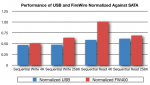
This should not come as a shock to anyone, as it has been proven before, but let me take this moment to say that, yes, despite their rated speeds, 400-megabit FireWire S400 (aka IEEE 1394) is faster than 480-megabit USB 2.0.

While swapping out disk drives (first to upgrade the internal drive in my MacBook Pro and later to give Time Machine more room), I took some quick performance snapshots with xbench and showed that, depending on I/O type, FireWire can be almost twice as fast as USB, but neither really holds a candle to SATA.

I also took the opportunity to compare the highly-integrated USB 2.0 controller in my Maxtor OneTouch 4 Mini with the much more complicated FireWire/USB combo found in the Verbatim SmartDisk, as well as the performance of three popular notebook hard disk models.

Continue Reading »

Share this post:
  • Digg
  • del.icio.us
  • StumbleUpon
  • Technorati
  • Reddit
  • Google
  • Slashdot
  • Facebook
  • Pownce

Apple
Terabyte home

Comments (1)

Permalink

Storage Fixes in VMware ESX Server 3.5 Update 2

VMware just released Update 2 for VMware ESX Server 3.5 (Virtual Infrastructure), and it includes some storage fixes of note:

  1. Support for Volume Shadow Copy Service (VSS) for filesystems Windows Server 2003 and Windows Server 2008 guests.  This means VMware services like VCB and SRM can now signal Windows Server to quiesce filesystems before creating a clone or snapshot and is a major addition!
  2. Windows Server 2003 guests also get application quiescing, where supported.
  3. You can now extend a live, running VMFS volume as storage is added, just like Windows Vista and 2008 guests could already do with raw device mode (RDM).  Note that this only works for flat disks with no persistent snapshots open.

Continue Reading »

Share this post:
  • Digg
  • del.icio.us
  • StumbleUpon
  • Technorati
  • Reddit
  • Google
  • Slashdot
  • Facebook
  • Pownce

Enterprise storage
Virtual Storage

Comments (3)

Permalink

How To Move OS X Time Machine Backups To A New Disk
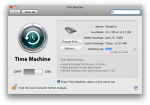
Uh oh, after this backup I'll only have a few GB left on my Time Machine backup drive!

Uh oh, after this backup I'll only have a few GB left on my Time Machine backup drive!

Well, that happened pretty quickly!  After upgrading the internal hard drive on my MacBook Pro to 320 GB, I moved the 120 GB disk Apple shipped with the machine to my Verbatim SmartDisk FireWire+USB enclosure to use as a Time Machine backup target.  Despite applying some tricks to reduce the amount of data backed up by Time Machine, I filled up the 120 GB drive pretty quickly indeed!  So I decided to swap the 160 GB drive from my Maxtor OneTouch 4 Mini USB drive into the (faster) Verbatim FireWire enclosure to give Time Machine some (temporary) breathing room.

It turns out that you can move Time Machine backups easily, with included OS X tools, and without breaking anything.  My old backups are still visible, and I have another 40 GB to work with.  Read on for the details!

Continue Reading »

Share this post:
  • Digg
  • del.icio.us
  • StumbleUpon
  • Technorati
  • Reddit
  • Google
  • Slashdot
  • Facebook
  • Pownce

Apple

Comments (2)

Permalink

Quick and Easy Bluetooth Sharing Between PC and Mac

As I transition to the Mac, I often find myself needing to transfer a file back and forth quickly. I could create SMB shares on both systems, but this requires both to be connected to a wired or wireless Ethernet LAN. Luckily, both Vista and OS X offer functional Bluetooth sharing technology for quick, easy file transfer on the fly.

Continue Reading »

Share this post:
  • Digg
  • del.icio.us
  • StumbleUpon
  • Technorati
  • Reddit
  • Google
  • Slashdot
  • Facebook
  • Pownce

Apple

Comments (0)

Permalink

Don’t Bother With Multiple Colored iPhone and Exchange Calendars

One of the things that surprised me about iPhone 2.0 was the introduction of multiple calendars.  I figured that the device couldn’t handle more than one calendar, since syncing to Exchange meant you lost all other calendars.  But the exact opposite is true:  Everyone who uses Exchange ActiveSync will suddenly see a number of different calendars appear, and this can cause much confusion.

After experimenting with my iPhone, Outlook 2007, and Entourage, I think I’ve figured out how to work with these new mult-colored calendars.  Read on for the dirt!

Continue Reading »

Share this post:
  • Digg
  • del.icio.us
  • StumbleUpon
  • Technorati
  • Reddit
  • Google
  • Slashdot
  • Facebook
  • Pownce

Apple
Personal

Comments (2)

Permalink

My New All-Apple Feed

With all the Apple-related content popping up on this blog, I decided to add an Apple-only feed to the mix.  Now, if you’d like to follow my adventures with the Mac, iPhone, and other Apple junk, and don’t care about all the enterprise storage and general home computing stuff, you can subscribe to just the Apple feed.  Most folks are subscribed to my Everything feed, which includes all posts, and won’t need to change a thing.

So here’s a summary of my feeds:

  •  All Posts - Everything I post in any category
  •  Apple - Posts related to Apple, the Macintosh, the iPhone, iTunes, and the like
  •  Computer History - Posts about the old computer junk I love so much
  •  Enterprise Storage - Posts related to my profession
  •  Personal - Posts of interest to family and friends
  •  Terabyte Home - Posts relating to the proliferation of storage and computer technology in the home

Bonus points to anyone who can identify the item pictured!

Share this post:
  • Digg
  • del.icio.us
  • StumbleUpon
  • Technorati
  • Reddit
  • Google
  • Slashdot
  • Facebook
  • Pownce

Apple
Computer history
Enterprise storage
Everything
Personal
Terabyte home

Comments (0)

Permalink

A Few iPhone Exchange ActiveSync Gotchas

I’ve been running OS 2.0 on my (first-generation) iPhone for a week and a half now, and as I mentioned before, Exchange ActiveSync push email, calendaring, and contacts was one of the main things Iwas looking for when I upgraded.  That article on setting up ActiveSync has since become my top blog post by far, pulling in literally thousands of hits per day, so I must not be alone in wanting this functionality.

But it turns out that the green grass of iPhone/Exchange integration has a tint of brown.  Folks have experienced issues getting the service set up, and it guzzles battery juice like a toddler at a lemonade stand.  Read on for my notes and suggestions… Continue Reading »

Share this post:
  • Digg
  • del.icio.us
  • StumbleUpon
  • Technorati
  • Reddit
  • Google
  • Slashdot
  • Facebook
  • Pownce

Apple
Terabyte home

Comments (13)

Permalink

Which Storage Protocol For VMware?

I had two great storage virtualization seminars this week, in New York and Philadelphia.  As usual, audience participation was key, and interest in VMware and Hyper-V remains high.

One of the main questions I always get is which protocol one should use for VMware storage. My recommendation remains that the answer is an organizational one more than a technical one.  There are certainly performance, CPU utilization, and support differences between Fibre Channel, SCSI, iSCSI, and NFS on VMware, all of these can work fine in many situations.  Although this is addressed in my presentation, I thought it wise to point out some of my sources and (concurring) opinions.

First, I point you to the official VMware VI Team blog, where they reiterate that VMware is protocol-agnostic.  They commit to support all storage protocols equally, and promise to add missing support as soon as possible.  See especially their table of support, which shows that iSCSI currently can’t be used for clustering (!), among other insights.

I’d also like to point out three sources for my seminar slides:

The only real gotchas at this point are the lack of clustering support for iSCSI, the inability to boot a VM from software iSCSI, and the learning curve for Fibre Channel.  Make your choice based on what you have and what you know - that’s the best choice to make!
Share this post:
  • Digg
  • del.icio.us
  • StumbleUpon
  • Technorati
  • Reddit
  • Google
  • Slashdot
  • Facebook
  • Pownce

Enterprise storage
Virtual Storage

Comments (0)

Permalink