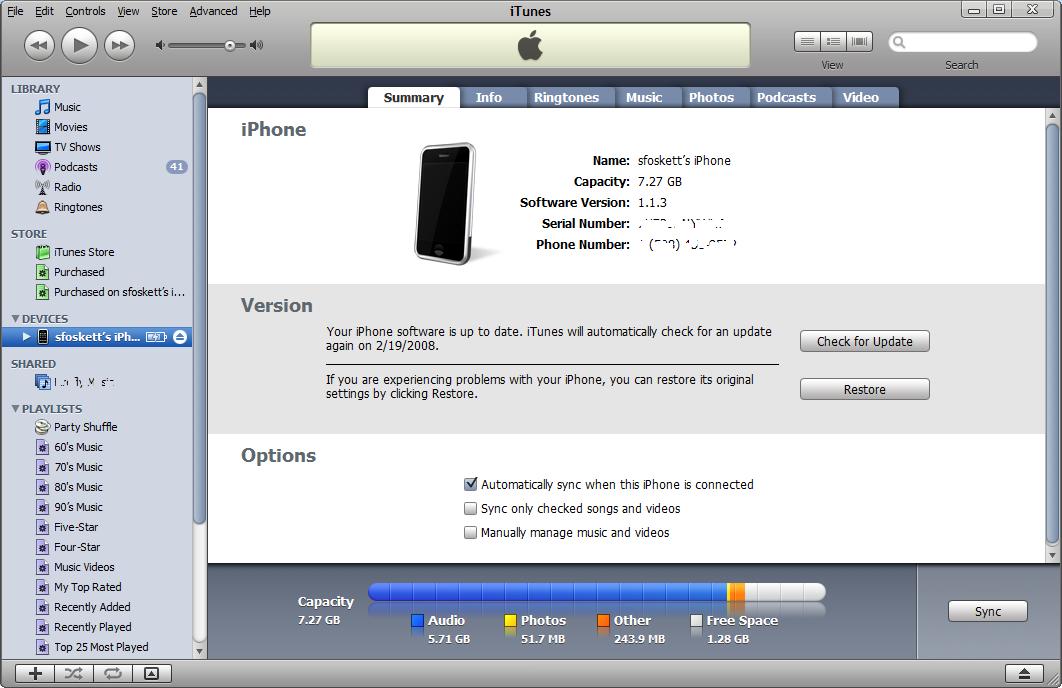
 Ever since I upped my iPhone to version 1.1.3, I’ve been puzzled by the allocation of a couple hundred megabytes of capacity to “Other”. Look at the picture here – notice that it has 243.9 MB of “Other”? Some of that is my custom ringtones (self-created thanks to AtomicParsley!), but not much. The rest magically appeared when I updated the phone from 1.1.2 to 1.1.3. The other iPhone in my family has the same mysterious space gobbler, but the number is slightly different.
So what is taking up this space? Other people have noticed the issue as well, and no one’s figured out just why it happened. Some have suggested it might be email, webclips, notes, etc, but this doesn’t explain why it jumped after the upgrade.
My theory is that it is a backup of the operating system. Since the download was 165 MB, it seems to me that Apple might be keeping a spare copy of the whole thing on the phone as a backup (or something). Perhaps it was supposed to be deleted after the upgrade and wasn’t? Or perhaps it’s something like TiVo’s “amusing” OS image card trick?

Leave a Reply