ZeroTier is an incredibly useful tool to enable true access from anywhere to any networked resource. Although TrueNAS has removed ZeroTier support, the FreeBSD package is easy to install and seems to work fine! The only issue is that it doesn’t persist across reboots without some major risky work.
Time Machine
Mac OS X Bug: ExFAT Hangs Spotlight and Time Machine
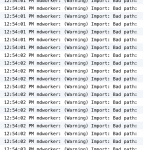
I’ve had terrible issues with Mac OS X never completing Spotlight indexing and Time Machine backups. I was pulling out my hair until I decided to check the console log. That’s when I saw this: Thousands of mdworker errors, with a dozen appearing every second. What could it mean?
Key Storage Features in Mac OS X 10.7 “Lion”

Apple’s not an enterprise company or a storage company, but Apple does have enterprise storage features in their operating systems. And Mac OS X 10.7 “Lion” is a great case in point. From Versions to Time Machine Local Snapshots to AirDrop, Lion brings some storage love, and NFS, SMB, and Xsan are there, too. Let’s look at what’s new and key in terms of storage in the latest version of Mac OS X.
Local Snapshots in Mac OS X Lion Time Machine: Is It A Good Idea?
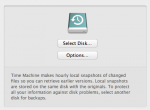
Although it is not a full-featured backup application, I heartily endorse Time Machine since its ease-of-use encourages average users to backup their data and enables them to recover lost files in a user-friendly environment. Time Machine local snapshots add another layer of protection for Apple users on the go. As long as they do not rely on local snapshots exclusively for data protection, I call that a win.
“Time Machine completed a verification of your backups. To improve reliability, Time Machine must create a new backup for you.”
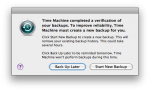
Time Machine is one of my favorite Mac OS X features but Apple recently rolled out a “Time Capsule Backup Update”, and included it in Mac OS X 10.6.4, that is causing confusion and concern. In the name of improving “the reliability of your Time Capsule backup,” this update has the unfortunate side-effect of detecting errors in existing backup bundles and forcing users to start a new backup. It happened with two of my Macs so far, so I was keen to find out what’s going on.