Xen 3.3 Update Brings Paravirtualized SCSI
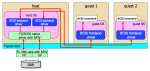
One of the new features in Xen 3.3, released this week, caught my eye: Paravirtualized SCSI (PVSCSI), which allows a guest OS to directly interact with a SCSI (or Fibre Channel) HBA. This should allow more specialized applications to be virtualized in Xen environments that use SCSI or FC storage without requiring the addition of a dedicated physical storage port per guest.


PVSCSI gives virtual machines direct access to SCSI and FC HBAs, and plays nicely with NPIV (Xensummit diagram by Fujitsu)

PVSCSI gives virtual machines direct access to SCSI and FC HBAs, and plays nicely with NPIV (Xensummit diagram by Fujitsu)

Functionally similar to VMware’s Physical Compatibility Mode for Raw Device Mode (RDM) volumes, PVSCSI enables certain applications that require direct SCSI communication to function in a virtual environment. Examples include Oracle RMAN, backup applications, and potentially SAN management software.

PVSCSI plays nicely with N_Port ID Virtualization (NPIV), too, so you don’t need to assign a physical HBA port to each guest - they can all share a port or two, and each would have his own N_Port on the Fibre Channel fabric.

In their Xensummit presentation about PVSCSI, Fujitsu showed impressive performance numbers, demonstrating that the technology doesn’t cause much of a performance hit even though it is substantially more complicated than the alternative approaches. I do wonder how PVSCSI managed to outperform Dom0 with 128k writes, but let’s chalk that up to insignificant variations in timing…

Now if only Xen would update the (3.2-era) readme files on their download page!

Enterprise storage
Virtual Storage

Comments

Permalink

Storage Fixes in VMware ESX Server 3.5 Update 2

VMware just released Update 2 for VMware ESX Server 3.5 (Virtual Infrastructure), and it includes some storage fixes of note:

  1. Support for Volume Shadow Copy Service (VSS) for filesystems Windows Server 2003 and Windows Server 2008 guests.  This means VMware services like VCB and SRM can now signal Windows Server to quiesce filesystems before creating a clone or snapshot and is a major addition!
  2. Windows Server 2003 guests also get application quiescing, where supported.
  3. You can now extend a live, running VMFS volume as storage is added, just like Windows Vista and 2008 guests could already do with raw device mode (RDM).  Note that this only works for flat disks with no persistent snapshots open.

Continue Reading »

Enterprise storage
Virtual Storage

Comments

Permalink