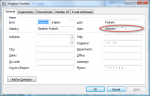
Determine Your Outlook Web Access URL

I’ve been trying to work out how to sync my various data sources into a cohesive whole for a while now, and using the Mac has made it somewhat easier, since it supports a variety of data sources. For users of Microsoft Exchange, one of the most valuable sources for sync data is Outlook Web Access (OWA), because it uses the open(ish) WebDAV standard rather than the (closed) MAPI.

One thing that’s been getting in the way is the URL: You need to enter a correct, canonical URL to access OWA, and it can be tougher than expected to figure this out, since it has changed with newer versions of Exchange. But I’ve discovered some breadcrumbs that helped locate mine, and thought others might like to see these, too.

Continue Reading »

Apple

Comments

Permalink

Don’t Bother With Multiple Colored iPhone and Exchange Calendars
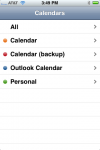
One of the things that surprised me about iPhone 2.0 was the introduction of multiple calendars.  I figured that the device couldn’t handle more than one calendar, since syncing to Exchange meant you lost all other calendars.  But the exact opposite is true:  Everyone who uses Exchange ActiveSync will suddenly see a number of different calendars appear, and this can cause much confusion.

After experimenting with my iPhone, Outlook 2007, and Entourage, I think I’ve figured out how to work with these new mult-colored calendars.  Read on for the dirt!

Continue Reading »

Apple
Personal

Comments

Permalink

How To Set Up iPhone Exchange ActiveSync

It’s finally here!  The iPhone now has most of the functions of the BlackBerry - over-the-air push and sync of Exchange email, contacts, and calendars!  Apple let the 2.0 OS out of the bag earlier today, and intrepid souls (and me) have taken the plunge and installed it.

While most people, including me, headed to the (also active) App Store to try out the native games, I quickly turned the other way - towards the new Microsoft Exchange integration.

Read on for my first impressions and instructions on getting it up and running.

By the way, the apps are great!  Sega’s Super Monkey Ball is touchy, but I think I’ll get the hang of it.  And my 4 year old loves Jirbo Match!  Too bad the Red Sox weren’t playing or my test of MLB At Bat would have been much more exciting!

Continue Reading »

Apple
Personal
Terabyte home

Comments

Permalink

Key Technical Differences Between Email Archiving Products?

I’m working on a new feature article for Storage Magazine focused on selecting an enterprise email archiving product.  This is something I’ve done quite a bit of work around, so I decided to redirect it into a “bride magazine” type “ten things to look for” item.  If you too know about the field of email archiving products, how about weighing in with a comment or email with your opinion?

Without further ado:

The ten technical things some email archiving products do and others do not do*

  1. Capture all messages - Can the archiving system really guarantee that every message is captured?  Really?  Even if a user does the old “double-delete” and gets rid of every copy on the system before the “archive sweep” happens?
  2. Search and e-discovery - It’s amazing to me that some archiving systems have really terrible search capabilities.  But more important is whether they can handle real e-discovery requests from the legal department.
  3. Record user metadata - Capturing what users do with a message (read, file, ignore, forward) is a tough nut to crack, and it might just be impossible with some archiving technologies!
  4. Archive stuff other than email - Some are general archives that can take just about any content, while others are purpose-built for email.  I am hemming and hawing on whether this is critical in an email archiving product, and which is preferrable…
  5. Security and chain of custody - How secure is the archive content?  If the answer is “kinda” then your legal department is not going to be happy!
  6. Ingest an existing mail store or PST file - It’s great when an archiving system can capture every email once it’s installed, but it’s a whole other matter to be able to pull in pre-existing content.  But beware!  You have to flag this stuff as possibly incomplete and perhaps even unreliable!
  7. Integrate with mail clients - What does the end user see?  Is it an unfamiliar web link or a reassuring Outlook window?  What about Outlook Web Access users?  Or the 8,000 other email clients?
  8. Allow off-line access - Can a user access the archive when they’re on a plane?  Can they see it on the train?  Would they, could they in the park?  Will you, will you when your data center goes dark?
  9. Integrate with third-party tools - How well will the archive really serve legal if it can’t export messages to their favorite search tool?  Note - some can even talk directly with these products!
  10. Integrate with mobile users - Ok, I am on an iPhone in the enterprise crusade, but I’ll admit that lots of folks use BlackBerries and Windows Mobile (and Symbian) too.  How can they access the archive?

I’ve worked with most of the products out there, and know who can and can’t do these things.  But not all are important to everyone, so I just can’t say “this product is best.”  But I’m very interested in your opinion.  What key technical differentiators would you suggest?

* Not the actual article title!

Enterprise storage
Personal

Comments

Permalink

Import your old Outlook/Express PSTs to Gmail

Like so many other people, I’ve switched my personal email use over to Gmail. In fact, I did it back in mid-2005, redirecting my personal address on my private fosketts.net domain from Dreamhost’s POP mail service to my gmail account. I’ve been happy with it ever since, but my old mail still sat on my old desktop PC in a PST file created by Microsoft Outlook.

I love that Gmail keeps all of my email online and easily searchable - when I need to locate some old bit of information, I can usually find it by typing a couple of words into the Gmail search box, no matter where I am. Since I travel a lot, I’ll often log into Gmail from my work laptop, a hotel PC, or my iPhone just for this purpose.

But the other day, I remembered a message my dad sent me a few years ago and wanted to look it up. I was stuck, though, because the message was sitting in a PST on my (powered-off) desktop back at home. I was able to get to it from my laptop through a complicated process that involved ssh, my Tomato-powered router, wake-on-LAN, and remote desktop… Not something I wanted to go through again!

I got thinking that I’d love to have all of my mail in Gmail - even those messages from before I started using it. Turns out, lots of people were thinking about this way back when, but it’s always been difficult to import mail into Gmail, and lots of folks think it still is. But I found that, thanks to Gmail’s new IMAP feature, it’s now super easy to get your PST (and Thunderbird, etc) mail into Gmail! Read on for how I did it, and how you can too!

Continue Reading »

Personal
Terabyte home

Comments

Permalink