Optimus Maximus: Ultimate Keyboard Non-Demo at CES!

Aah, Veronica Belmont, I wish you would ask the hard questions…  Yes, the Mahalo/Engadget geek-reporter got an in-person demo (with Artemy Lebedev) of an Optimus Maximus keyboard at CES, but (predictably) the video leaves much to be desired.  You might remember my earlier discussion of this amazing $1500 OLED-equipped display/keyboard monstrosity.  I’m still not buying it!

I was surprised that, although the keyboard seems to be functional, Mahalo doesn’t show the OLED keys actually change.  I would have thought that would be a good use of 15 seconds…  The updating doesn’t seem to work either - the keys have pictures, and they flicker and go out when Art unplugs the board’s power, but they never get updated with the “tasteless” designs he creates on the iMac!  In fact, when he powers on the keyboard again, it appears that it never comes back to life at all - random colored squares are displayed instead of letters!  Could it be that the ultra-board still doesn’t, you know, work?!?

He spends a lot of time demoing the ability to create custom key displays, even mentioning that you could play Tetris on the board,  but there were some concerning bits…  He never mentions animation, says that the key macro plugins “have to be created by us”, and stresses that the initial shipment (”now”) won’t be user-upgradeable.  So if you want your Maximus today, you get a pretty, $1500 keyboard with lots of pictures that you can’t change.  Yay!

I’m still not sold on the Maximus.  I love the concept of in-key displays in general, as in a remote control or computer peripheral, but am not sure that this is the right execution of that concept.  Ars Technica reports that the keys are wide and the screens don’t move, making typing difficult, Wired notes the amazing greasiness of the keys, and did I mention how expensive it is?  But hey, you can pull a Cash/Kemp and buy that keyboard one key at a time!  I’d love to see some company in Shenzhen take the idea and run with it.

On the other hand, I really do like the Lebedev Mini Three.  For “only” $150, you get a three-key display that might do what Windows SideShow hasn’t been able to deliver - add peripheral displays to the PC.  And since that “PC” can be a Mac, lots of folks will be happy!

Terabyte home

Comments

Permalink

Optimus Maximus: It’s Beyond This Keyboard-Head
Have you heard of the Optimus Maximus yet? It’s the ultimate computer keyboard (no kidding!), it costs $1500 (no, really, I’m serious!), and I’m not interested (even though I’m a keyboard nut).

First, an introduction to the Maximus: It’s a 113-key PC keyboard. But each key is actually a mini OLED display, so the user can apply custom labels on the fly based on what application is in use. This is fairly cool - the (Photoshopped) demo pictures show a specialized Quake layout and talk about Hiragana and even Quenya (for all you Elves in the house!).

So imagine a massive keyboard (most common ‘boards have 101 to 105 keys) with glowing, possibly animated, keys. One that has to be plugged into its own power supply because no USB port could handle the load. One where the layout might just change on you when you alt-tab (or command-tab - Mac OS X works, too) over to another application. One that cost you more than many desktop PCs.

Having a hard time imagining it? Well, you’ll have to because even though it’s been the geeky fanboy’s dream since 2005, it’s still not shipping. Wait ’till February, they say! In the mean time, you can get a fairly cool 3-key version (is something with just three keys really a keyboard?!?) called the Mini Three for just $150! And as if one vaporware keyboard wasn’t enough, the Optimus people just announced variants with 47, 10, and one (One?!? The space bar?!?) programmable key for the cost of a sweet hi-def digicam, a full-price TiVo Series 3, or an iPhone (plus tax)! And they’re all shipping in February! Really! Here, look at the box!

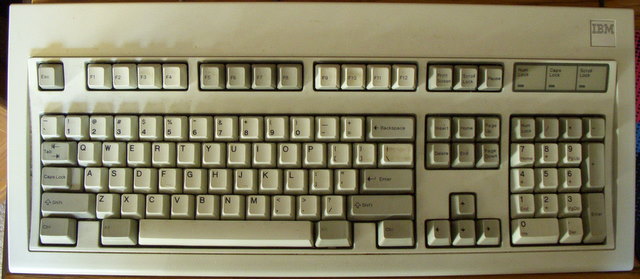
This is madness. I love keyboards, but this thing is not a keyboard. It’s a multi-display peripheral that also has keys - which is why the Mini Three is fairly cool.IBM Model M

Me? I’ll stick to my beloved 1987 IBM Model M - a keyboard that has served me for nearly two decades, attached to a dozen different PCs. A keyboard that people can truly wax enthusiastic for, since it’s a keyboard not some multi-display monstrosity. A keyboard that you can type 90 words per minute on. A keyboard that can handle a coffee spill. A keyboard that makes people on the other end of conference calls say “what is that noise?” A keyboard you can still buy (new old stock) for under $100!

Though I do miss the programmability of the Gateway AnyKey sometimes…

Computer history
Personal
Terabyte home

Comments

Permalink