
Hard disk drives keep getting bigger, meaning capacity just keeps getting cheaper. But storage capacity is like money: The more you have, the more you use. And this growth in capacity means that data is at risk from a very old nemesis: Unrecoverable Read Errors (URE).
NTFS
The Four Horsemen of Storage System Performance: Get Smart
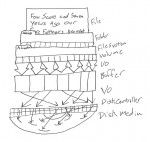
The Four Horsemen of storage system performance cannot be denied, but they do offer a clear path forward. Storage systems must improve in many different areas, from spindles and drives to caching and I/O bottlenecks. But above all else, storage systems must become smarter in order to become faster, and this requires greater insight into the true nature of the data stream being stored. All storage performance developments, from the laptop to the enterprise, boiled down to adaptations to the demands of the Four Horsemen.
Microsoft Adds Data Deduplication to NTFS in Windows 8
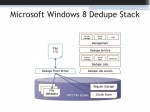
The next version of Microsoft Windows Server includes integrated data deduplication technology. Microsoft is positioning this as a boon for server virtualization and claims it has very little performance impact. But how exactly does Microsoft’s de-duplication technology work?
Back From the Pile: Interesting Links, January 7, 2011
It’s been a slow week (the holidays) and a crazy one. I’ve started pouring out the thin provisioning series, with 10 posts so far, as well as launching a new video “talk show” about enterprise IT. And I’ve got a new post over at SearchStorage, too. Whew!
Monitoring Filesystem Metadata For Thin Provisioning
I began by introducing the core problem: Storage isn’t getting any cheaper due to storage utilization and provisioning problems. Thin provisioning isn’t all it’s cracked up to be, since the telephone game makes de-allocation a challenge. So now let’s talk about how to make thin provisioning actually work.