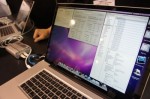
Although the SANLink appears to be something of an oddball, it indicates the shape of things to come. Thunderbolt will transform the use cases for portable and all-in-one computers, likely spelling the end of the empty boxes for desktop use. In fact, I would not be at all surprised if Apple soon canceled the Mac Pro line entirely in favor of a beefed up Mac Mini and iMac stable. And the dozen or so MacBook Pro users wanting to connect to a Fibre Channel SAN will finally have the opportunity to do so sometime later this year.
iMac
Posts about the 2009 Apple iMac
Will The First Thunderbolt Peripheral Be The iMac?

Apple and Intel introduced the impressive new Thunderbolt interconnect last month on the MacBook Pro line, but folks like me who bought one have nothing to connect to yet. It was exciting to see the wide variety of Thunderbolt peripherals on display at the NAB show in Las Vegas last week, but none of these will ship to end-users before the middle of the summer. But evidence is mounting that Apple will be the first out of the gate with a Thunderbolt peripheral, it just won’t be the sort of peripheral you might expect. I am hearing rumors that the new iMac, to be introduced this month, will be both a Thunderbolt host and peripheral in one! Read on for what this means in the real world.
How To Use Mac Photo Booth With No Flash or Delay

Among the useful features and applications bundled into Mac OS X, Photo Booth is not exactly the most useful. Still, it’s handy to sometimes have an application to snap a photo of yourself or your surroundings while on the go. But Photo Booth has no preferences pane, and the default delay and BRIGHT screen flash can ruin your picture. Here’s a quick tip on how to use Photo Both with either (or both) turned off!
Benchmarking the 2011 13″ Core i5 MacBook Pro

As I mentioned in my previous article, I decided to buy the 13″ Core i5 (base model) MacBook Pro. It meets my needs as a travel workstation, but how does it perform? I decided to benchmark it against my other Macs to see how it stands up.
ioSafe SoloPRO Review: Is It The Safest Place For Your Data?
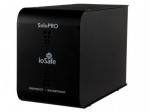
It’s hard to stand out in the world of external storage devices, and doubly-hard to compete with the hard disk drive makers themselves. This hasn’t stopped folks like Iomega, Verbatim, and LaCie from trying to impress customers with flashy cases, software bundles, and clever functionality. But clever new twist on the external hard drive concept just rolled into the Pack Rat lair: The ioSafe SoloPRO is fireproof and waterproof. Cool!