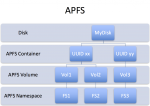
Although not discussed in today’s keynote, Apple is adding a new “universal” filesystem to iOS and macOS. Apple File System (APFS) will likely replace HFS+ as the default filesystem for Macintosh computers, iPads, and iPhones and brings a wealth of modern features. But judging from the initial developer documentation, that’s not going to happen for a few more years. And there’s still much confusion about how APFS and CoreStorage, introduced in Mac OS X 10.7, will interact.
HFS
Check Your Mac’s Drive and Reclaim 5 GB of Wasted Space!
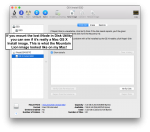
Since most MacBooks are SSD-only, one would think Apple would be careful about leaving junk around on the drive. But many people are finding 5 GB wasted for a years-old leftover Mac OS X install image! Here’s how to reclaim that space if you’re missing it…
Why Big Disk Drives Require Data Integrity Checking
Hard disk drives keep getting bigger, meaning capacity just keeps getting cheaper. But storage capacity is like money: The more you have, the more you use. And this growth in capacity means that data is at risk from a very old nemesis: Unrecoverable Read Errors (URE).
The Four Horsemen of Storage System Performance: Get Smart
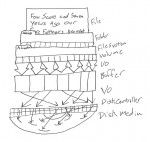
The Four Horsemen of storage system performance cannot be denied, but they do offer a clear path forward. Storage systems must improve in many different areas, from spindles and drives to caching and I/O bottlenecks. But above all else, storage systems must become smarter in order to become faster, and this requires greater insight into the true nature of the data stream being stored. All storage performance developments, from the laptop to the enterprise, boiled down to adaptations to the demands of the Four Horsemen.
Three Key Storage Features Missing in Mac OS X “Lion”

Apple is not in enterprise storage company to be sure, and news from WWDC dashes any hopes we had for ZFS and iSCSI support. USB 3.0 seems a foregone conclusion, but Apple seems intent on ignoring it as long as possible. Although I welcome the new storage features included in Lion, it is disappointing that these were left out.