
As impressed as I am with Apple’s iPhone App Store, with its simple purchasing and automated installs and upgrades, it would be better if the thing actually worked reliably. Along with sometimes forgetting song purchases, there seems to be some gremlin that causes the App Store to forget that certain apps are installed and not check for updates. This left me scratching my head, as updated apps like Super Monkey Ball, Facebook, Evernote, and Cube Runner remained in their previous state.
I suspect that the App Store did not update its internal record of my purchases when I wiped and re-set up my iPhone shortly after upgrading to OS 2.0. When I did this, I reinstalled all the apps from iTunes’ backup copy rather than re-downloading them from the App Store, and perhaps this caused them to be overlooked.
While I can’t be sure of the cause of this forgetfulness, I did discover a workable solution. For each questionable app, follow these steps:
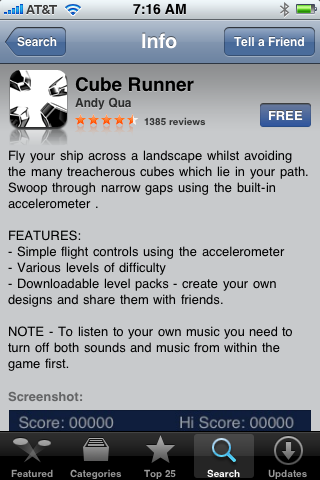
- On the iPhone (or iPod Touch), go into the App Store and search for an app you already purchased.
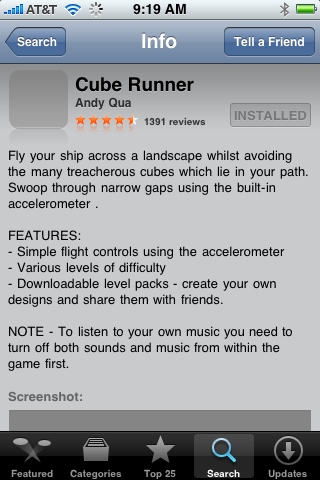
- If the “purchase” button does not say “INSTALLED”, then the App Store isn’t tracking its updates.
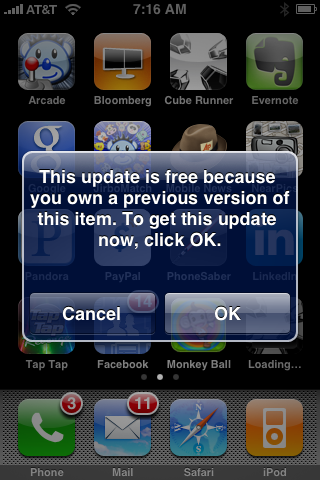
- In this case, go ahead and re-install the app. Apple (thankfully) won’t charge you again even for paid apps.
- Now, the phone will note that the app was already installed. This is good – let it download and upgrade.
- Now you’re golden. The App Store should again be tracking updates to this app.
Repeat this procedure for all questionable apps and you should be all set.
Note that this procedure only seems to work for apps that have been updated. If you have the latest version, but the app store isn’t tracking updates (as indicated by the lack of a “Purchased” button), you should be able to make it work by first deleting the app and then installing it fresh. Once again, Apple shouldn’t charge you again for the app when you do this, and it should begin tracking correctly.
I have the exact opposite problem.
I'll install an app, and if it gets deleted, when I go to download it again, Apple says it's Installed.
And I can't download it again.