 I’ve been running OS 2.0 on my (first-generation) iPhone for a week and a half now, and as I mentioned before, Exchange ActiveSync push email, calendaring, and contacts was one of the main things Iwas looking for when I upgraded. That article on setting up ActiveSync has since become my top blog post by far, pulling in literally thousands of hits per day, so I must not be alone in wanting this functionality.
But it turns out that the green grass of iPhone/Exchange integration has a tint of brown. Folks have experienced issues getting the service set up, and it guzzles battery juice like a toddler at a lemonade stand. Read on for my notes and suggestions…
Which Server?
By far the biggest problem folks have encountered when trying to enable Exchange ActiveSync on the iPhone has been finding the correct server name. Update: It turns out that Exchange 2007 has an Autodiscovery service for ActiveSync devices, and the iPhone supports and attempts to use this. But it will fail for anyone using Exchange 2003 or with an admin that turned this off…
If Autodiscovery fails, you have to manually enter the address. Most Exchange implementations have a variety of different servers these days, each with a unique hostname and IP address:
- The main Exchange server, which is normally only used for internal or VPN connections to Outlook using the MAPI/RPC protocol and often has an excitingly-weird name like em22dc.yourcompany.com. This is not what you are looking for.
- The external Exchange server for RPC over HTTPS connections from Outlook, which often has a nicer name like rpc.yourcompany.com. This is also not what you’re looking for.
- The Outlook Web Access server used by Entourage and for accessing mail using a web browser, which is often called “owa.yourcompany.com”. Getting warmer, but still not the right one.
- Entourage also uses an LDAP server, often called “ldap.yourcompany.com”, and might alias the OWA server as “dav.yourcompany.com”. Still not the right server for the iPhone.
- The one you want is the ActiveSync server, sometimes called “oma.yourcompany.com” since it’s mainly used for Outlook Mobile on Windows Mobile devices.
If your techies don’t know the first thing about the iPhone, change your tactics. Ask them which hostname they enter when configuring Windows Mobile smartphones and PDAs – these are very common, and this is the server you need with the iPhone!
One more thing: You might get lucky and find that one of those other server names works for the iPhone’s ActiveSync. This does not mean you’re using DAV or OWA on the iPhone – instead it means that they set up two services on the same hostname. But I haven’t seen this myself.
The Problem With Push
Let me start by saying that, so far, the push email experience with Exchange ActiveSync to the iPhone has been flawless for me. Amazingly, messages appear on my iPhone before they show up in Outlook on my PC, which is online with RPC over HTTPS. Whatever Apple (and Microsoft) did to enable push email certainly worked well! Perhaps a bit too well, though. After using ActiveSync push for a few days, I noticed that my battery was draining by early afternoon.
At first, I chalked this up to increased usage of the phone’s new features. But having spent the day (mostly) ignoring the phone while on vacation, I was shocked to see the battery icon turn red before dinner. Clearly something was eating my battery alive!
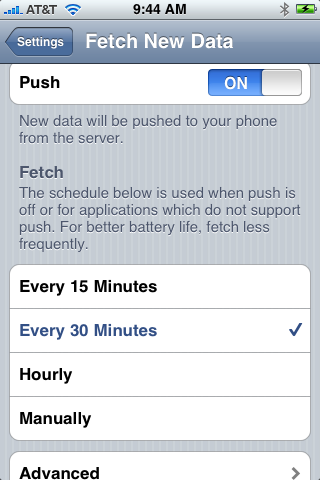 As an experiment, I turned off push in the iPhone’s Settings pane, opting for manual just to be safe. Are you surprised to learn that my battery was green all the next day? In fact, it barely used any power at all, even with 30-minute IMAP updates from Google Mail still running.
Note that the Push settings have been moved under “Mail, Contacts, Calendars” in OS 3.0.
Clearly ActiveSync push is a major battery hog, and I would imagine that 3G would be even worse than the miserly EDGE in the first-generation phone! What to do? You’ve got just a few choices:
- Go back to IMAP fetch and lose Exchange integration (boo!)
- Leave push enabled but plan to charge up more often or use WiFi, which is much more battery-friendly.
- Switch Exchange from push to fetch, which leaves the integration intact but doesn’t guzzle the juice as quickly
- Switch Exchange to manual update, which is very battery-friendly
I have decided on option 3 when I’m out and about to conserve battery power, since most of my email can wait a few minutes. And if I’m low on juice, I’ll switch over to option 4. But if I’m in the office, with my most-excellent WiFi and broadband connectivity, I’m leaving push enabled.
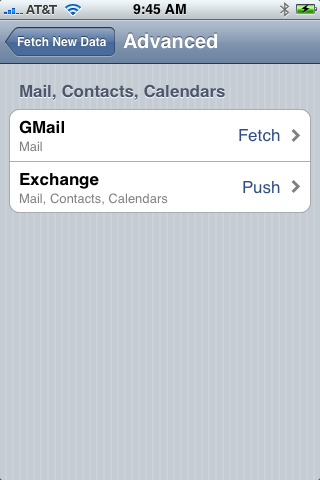 I think it’s worth noting that the push settings are stored in a separate control panel from the other mail settings, which is either an odd gaffe or an indication that other non-mail push options will eventually be added here.
- There’s a master switch on the main panel (shown above) which is nice, since you can quickly turn off all push to conserve juice.
- I’d love another setting option of turning off push mail based on battery level or on a schedule, like the BlackBerry has.
- You can also tweak the master fetch schedule setting here.
- Tap Advanced, and you can set each account’s settings – select push, fetch, or manual for each account based on your own preferences. If I was using MobileMe for personal email, I might be tempted to turn off push just for that account, since my spam can wait!
- One more thing – notice that you can set the name of your mail accounts to something other than your email address. That’s done in each account’s settings panel.
Hopefully, these two suggestions will help the multitude of folks who are having problems with Exchange ActiveSync on the iPhone. Drop me a line if I can be of more help!

It is strange that in the Activesync setup they decided to have the phone try to guess the server name and make you wait for it to fail before giving you the opportunity to put in the server name.
Dgeedgee,
Yes this is indeed highly weird! In fact, I’m not sure exactly how they’re trying to guess it, or where they’re looking, but I know of no standard method of determining the correct server based only on an email address. Maybe there is some protocol specified by Microsoft, but it’s a mystery to me. Anyone else?
Stephen
It is strange that in the Activesync setup they decided to have the phone try to guess the server name and make you wait for it to fail before giving you the opportunity to put in the server name.
Dgeedgee,
Yes this is indeed highly weird! In fact, I’m not sure exactly how they’re trying to guess it, or where they’re looking, but I know of no standard method of determining the correct server based only on an email address. Maybe there is some protocol specified by Microsoft, but it’s a mystery to me. Anyone else?
Stephen
Very useful post. And like you I came to the same conclusion, though I use hourly updates for the Fetch.
In my case, I am on a number of company email lists which receive messages every 5 minutes – killing my battery. I do have filters (including server side ones, set through Outlook Web Access over Internet Explorer on a Windows XP VM!) to move messages addressed to me or cc’d to me in to a specific folder. But the general flood of messages was killing the iPhone’s battery.
My IT admin tells me that Outlook has specific push settings that allow users to set rules that say “push” specific emails. For example, you can set a rule to only push messages with to/cc set to your email address.
I haven’t found these settings yet. I am looking at Outlook Web Access over Internet Explorer on Windows XP VM for the same – but no luck yet.
Anybody know about said Outlook push settings?
More on the subject from MSFT, comparing implemented features:
http://blogs.msdn.com/jasonlan/archive/2008/07/18/iphone-2-0-windows-mobile-for-push-email.aspx
and from Apple:
http://manuals.info.apple.com/en_US/Enterprise_Deployment_Guide.pdf
Thanks for this great information. I have a 3G iPhone on order, and one thing I can’t seem to find a firm answer on is whether or not you really do need AT&T’s more expensive PDA Enterprise data plan, as opposed to its cheaper PDA Personal data plan, in order to sync with Exchange. The official word from AT&T, via their sales personnel, their website, and some online reviewsof the phone would have you believe that you need the more expensive plan, but I’ve also seen evidence to the contrary. So, does the cheaper data plan do the trick?
Very useful post. And like you I came to the same conclusion, though I use hourly updates for the Fetch.
In my case, I am on a number of company email lists which receive messages every 5 minutes – killing my battery. I do have filters (including server side ones, set through Outlook Web Access over Internet Explorer on a Windows XP VM!) to move messages addressed to me or cc’d to me in to a specific folder. But the general flood of messages was killing the iPhone’s battery.
My IT admin tells me that Outlook has specific push settings that allow users to set rules that say “push” specific emails. For example, you can set a rule to only push messages with to/cc set to your email address.
I haven’t found these settings yet. I am looking at Outlook Web Access over Internet Explorer on Windows XP VM for the same – but no luck yet.
Anybody know about said Outlook push settings?
More on the subject from MSFT, comparing implemented features:
http://blogs.msdn.com/jasonlan/archive/2008/07/18/iphone-2-0-windows-mobile-for-push-email.aspx
and from Apple:
http://manuals.info.apple.com/en_US/Enterprise_Deployment_Guide.pdf
I can’t imagine that AT&T would be able to tell whether you were using ActiveSync or IMAP, so I can’t imagine you need an enterprise plan to use it on technical grounds. I’m using the same data plan as before…
Thanks for this great information. I have a 3G iPhone on order, and one thing I can’t seem to find a firm answer on is whether or not you really do need AT&T’s more expensive PDA Enterprise data plan, as opposed to its cheaper PDA Personal data plan, in order to sync with Exchange. The official word from AT&T, via their sales personnel, their website, and some online reviewsof the phone would have you believe that you need the more expensive plan, but I’ve also seen evidence to the contrary. So, does the cheaper data plan do the trick?
I can’t imagine that AT&T would be able to tell whether you were using ActiveSync or IMAP, so I can’t imagine you need an enterprise plan to use it on technical grounds. I’m using the same data plan as before…
Stephen,
If I understand correctly, there was, and is, only one data plan for the original iPhone, like yours. There are two data plans for the new phone, and of course the cheapest of those is more expensive than your plan, presumably because the new phone can pump more data through AT&T’s 3G network. But, regardless of price, the fact that they are even offering two plans, the more expensive of which is deemed an “Enterprise” plan, gives me pause. I have decided to be optimistic about being able to access Exchange, and use the phone’s VPN connectivity while operating under the cheaper data plan. Now, if my backordered phone would only hurry up and get here so I could find out for sure. . .
Steve
Steve,
I think trying it out on the cheaper plan is the right choice. My understanding was that the Enterprise plans were for businesses who would presumably need extra support and would sign up customers in bulk.
The iPhone is different from the BlackBerry, where you need to get AT&T’s enterprise plan to use BES instead of BIS.
Please do try it and report back here on how it goes. I’m sure lots of others would love to know! And of course, you can always upgrade your plan if you need to.
Stephen,
If I understand correctly, there was, and is, only one data plan for the original iPhone, like yours. There are two data plans for the new phone, and of course the cheapest of those is more expensive than your plan, presumably because the new phone can pump more data through AT&T’s 3G network. But, regardless of price, the fact that they are even offering two plans, the more expensive of which is deemed an “Enterprise” plan, gives me pause. I have decided to be optimistic about being able to access Exchange, and use the phone’s VPN connectivity while operating under the cheaper data plan. Now, if my backordered phone would only hurry up and get here so I could find out for sure. . .
Steve
Steve,
I think trying it out on the cheaper plan is the right choice. My understanding was that the Enterprise plans were for businesses who would presumably need extra support and would sign up customers in bulk.
The iPhone is different from the BlackBerry, where you need to get AT&T;’s enterprise plan to use BES instead of BIS.
Please do try it and report back here on how it goes. I’m sure lots of others would love to know! And of course, you can always upgrade your plan if you need to.
Steve,
I finally got my 3G iPhone and I
Steve,
I finally got my 3G iPhone and I’m happy to report that that cheaper (PDA Personal) data plan works just fine with Exchange. So, you were right: AT&T’s enterprise plan probably provides the same functionality for corporate customers, but at a higher price. Sort of like buying a land line: if you’re buying it for home, you pay less than if you’re buying it for a business.
I can’t believe I am the only person who has been confused by AT&T’s website, as well as some online reviews, regarding the new iPhone’s data plan. At any rate, all’s well that ends well.
Steve
Pixelmystic,
Great news! Let me know if they change their policies, ok?
I’ve been confused by AT&T’s plans for all of the 8+ years I’ve used them! 🙂
Pixelmystic,
Great news! Let me know if they change their policies, ok?
I’ve been confused by AT&T;’s plans for all of the 8+ years I’ve used them! 🙂
Options – Mail Setup – Send/Receive – Select All Accounts and press Edit – Account Properties – Remote Mail Tab – Filter
This will enable you to filter out anything that doesn’t meet certain criteria.
Options – Mail Setup – Send/Receive – Select All Accounts and press Edit – Account Properties – Remote Mail Tab – Filter
This will enable you to filter out anything that doesn't meet certain criteria.
I’ve got a hosted exchange product through CBeyond and have not been able to connect using the active sync and am stuck with an IMAP email connection to CBeyond which does not support any of the exchange collaboraton tools for scheduling. The CBeyond set-up want’s a “SAM Account ID” which i don’t have and CBeyond can’t give me. Any idea what this is and/or how I get a round this problem?
I have looked at all of the setup that you have discussed. I am able to access the OMA address from Internet Explorer but I continue to get a cannot connect to server error when trying to connect the iPhone to my exchange server. Any other hints would be greatly appreciated.
Make sure you are including your activesync domain name in your username – perhaps its sambryan.cbeyond or some such combination of things.
You put the exact same address into mail setup that you used in IE? With no VPN? And what did you get? Just because it gives you outlook web access (your mailbox in a browser) doesn’t mean ActiveSync is up and running. If people use Windows Mobile phones to access it it should work. But otherwise it might not. Remember, IMAP will probably work as a fallback…
Got a question (if this is the right place to ask)… 🙂
While my Exchange 2003 server (SP2) is a single server setup my addresses is as follows:
OWA: domain.com/owa
OMA: domain.com/oma
RPC: domain.com
How would I enter the server-name on the iPhone? I think that’s where my problem lies…
Thanks for the great article! 🙂
I think you want the OMA address. You can type a backslash by hitting “.?123” then “#+=” and you will find it in the “S” position.
Im trying to add my miscrosoft exchange email to my iphone ! I cant get it to work.. can you help me? i tried doing what you said.. but its not working. maybe im missing something? i have my other emails on, just not this one.
iphone and activesync is driving me crazy
ok so I had an issue with ssl and form based auth I first that with this document (method three) http://www.petri.co.il/problems_with_forms_based_authentication_and_ssl_in_activesync.htm
now using this new folder I can access my exchange using my firefox … http://www.domain.com/OMA I get a warning that is not support and I click continue.
using the iphone browser I can also access the same site.
I get not support click continue
I can see my mail.
but from the mail application it will just not work.
I have my OMA on the same server as my exchange thus http://www.domain.org/oma which works fine like I said. Just not in the mail application
I have included the server with the / as mentioned in the post below use 123 and the S key.
I am the exchange administrator
Michael
I did it without the OMA and now it works… I am also using the IP address of the server directly but I do not think that matters … just tested it does not matter
I guess the iphone must guess the OMA folder…
I had the same issue with my new Exchange setup. The official address was exchange.blah.com/owa, but that didn’t work with the iPhone. Instead I had to use just exchange.blah.com!
Brilliantly helpful procedure – thankyou. Not only do you say what to do, but you put it all into context and in a layman’s language that even I could understand. I now have emails if and when I want them and I understand how to facilitate what I require.
many thanks – Nicki Hattingh
Stephen:
I did a google search on Exchange reconciliation on the iphone and one of the results was your page here. I have a question that I cannot find an answer to.
I have no issues with EAS and my Exchange Host; email is pushed down in about under a minute or so, not bad at all. However, when I have deleted or moved entries while in Outlook connected to Exchange, even hours later the emails I moved or deleted are still sitting in my iphone mail box.
How do I get them to reconcile with Exchange???
Thanks.
Did you try the update on the mail application. The middle one between new and whatever… this will force the server to check for new mail.
Saved me a lot of time and trouble:
Microsoft Exchange Server Remote Connectivity Analyzer
https://testexchangeconnectivity.com/
I looked into this site, and it appears to be a valid Microsoft site. However, I cannot recommend using it, since it requires a valid login name and password along with your exchange server name. Yes, you could create a test account, but most folks will be tempted to enter their real username and password.
Do not do this!!!
Great article. Our school district uses mobile.domainname instead of oma.domainname, but the clincher was to enter something into the domain name field. My Outlook Web Access did not require a domain name and I didn’t remember what it was until I tried to access a server via remote desktop.
ActiveSync kept rejecting my password before I added the domain option. You would think it would have rejected my username instead — I might have figured it out quicker.
Great article. Our school district uses mobile.domainname instead of oma.domainname, but the clincher was to enter something into the domain name field. My Outlook Web Access did not require a domain name and I didn't remember what it was until I tried to access a server via remote desktop.
ActiveSync kept rejecting my password before I added the domain option. You would think it would have rejected my username instead — I might have figured it out quicker.
Thanks for the article! Glad that there are people out there that have a realistic view on the iphone! I love my iphone but the calendar, Todo and Notes functions are still very poor. Especially in combination with an Exchange server there is no third party calendar available! (at least not yet… I am waiting…)
One question is bothering me every day: Within ActiveSync I had the opportunity to set peak times and tell my device not to sync my emails outside the peak times. Means I had a quiet night without muting my phone. Is there a way to handle that on my iphone? Did you ever experience the same problem?
Thanks! Stefan
I use Exchange sync on my phone – and sync to work mail and calendar no problems.
Today I tried to setup my wife’s iPhone 3GS to her work’s exchange with peculiar results: calendar entries sync OK. The email folder of her work email are visible – but there are no emails in any of the folders, and sending an email doesn’t work either?
Any ideas?
My company’s email server can only be access via VPN. I have the VPN set up. But the exchange sever is where I am having trouble with. To use Outlook @ home, we use following set up: exchange server address is 192.168.0.1 and username & password. I want to know whether this can work with Itouch exchange mail set up.
hi guys
can any1 help with the owa email account setup on my iphone OS 3.1.1 please.
I have tried to setup but it keep saying that connection failed with server
thanks
eric
These are great tips. I encountered many of the same issues/experiences when I got my 3Gs back in January.
Something new has cropped up recently and I can’t seem to work through resolving it. I received a calendar invite in my Exchange account, opened it, closed it, deleted it from my desktop later, went back to my iPhone and…..there it was. It has been stuck there for weeks now. When I try to delete it from the iPhone, it goes away for a few seconds, then comes right back with a message that says something along the lines of not being able to move it, etc. Any suggestions on how to get rid of this stranded calendar invitation stuck in my inbox?
Thanks in advance for the assist!
I agree. Now we can concentrate on running our business instead of trying to be computer experts!
managed exchange hosting
My Outlook delets all message from my iPhone once i open Outlook. Ho do i stop this from happening and keep my emails on my iPhone once Outlook is opened? Thanks in advance.
I am having problem configuring my office email account using Exchange server option in i phone, Can some one help me with that, am first time user
After connecting my new iphone up to my exchange server 2007, my phone constantlt ask for a Password. Exchange works great but the constant locking and asking for a Password is annoying.As anybody else had this problem?
I get all my mail i al my sub boxes in m exchange mail but the main in box does not connect. Any words of wisdom for my iphone4
Same problem. Calendar and contacts are syncing nicely with exchange, inbox folders show up correctly, but my exchange inbox remains empty. I can even send email from the exchange account on my iPhone but can’t seem to get any.
Even weirder is that I have this configured on an iPad and iPhone but the problem is only manifesting on the iPhone. Both device are using the same exact settings.
I am on exchange server 2010.
Help!
Question for you all. I want to know how to prevent people from downloading email to their iPhone from my Exchange 2003 server. If I disable Exchange ActiveSync (and IMAP, POP, etc) for an specific user, but leave OWA on for everyone, can the iPhone/iOS still download email locally via OWA? I know personal Blackberry devices can so I am going to block the most well know Blackberry servers (ATT, VZW, Sprint, etc) and allow only our BB we config to access our BES server. For HIPPA regulatory reasons we want to prevent any email from staying on a device we haven’t forced to be encrypted. Thanks!
Hello, I am connecting from my IPAD via VPN into my work network with no problems. I can connect to internal IP’s with no issues. When I add my user email settings in the exchange profile it verifies the credentials and lets me add the account but when I open emails I get “connection to the server failed” can anyone help? I have read somewhere that activesync uses a non standard naming convention for the exchange server but I am unsure how to find out what it is. If the server is already inside the network the internal IP should be sufficient?
I have an iphone 4 and I am attempting to set up exchange on my phone but for some reason cannot figure it out…is there any way someone can e-mail me or walk me through this step by step?
Here’s a unique problem,
I have an Exchange 2003 Server that was upgraded to an Exchange 2010 Server. My account was moved to the new server, but because of issues it was moved BACK to the 2003 Server. My iPad and Outlook are working fine, but not my iPhone. The iPad and iPhone have the same EXACT settings, and both are working over the 3G network. I noticed that all my folders show up on the iPhone, which indicates that the Cache is holding the settings (perhaps from the 2010 Server). How can I clear the cache to get a “clean” reconnect to the 2003 Exchange Server?
We have done a test remote wipe of an iPhone and an iPad. What happens is the device is completely wiped of all data including the OS. You can reinstall the OS via iTunes on your desktop though. But you loose all your personal data.
My lawfirm uses Cbeyond for VOIP. Thus I must use the imap.cbeyond.com settings to receive email. It was setup correctly and for about two years I was able to send and receive Emails with no problem. But I woke up on Saturday morning October 31 and I cannot receive email. I can still send email just fine. I have been on the phone with Cbeyond for more than an hour, and with ATT and Apple and no one has an answer. The error message says “The mail server “imap.cbeyond.com” is not responding. Verify that you have entered the correct account info in Mail settings.” Cbeyond has worked with me on the settings for an hour and they are convinced the settings are correct. ATT and Apple point the finger at Cbeyond. What in the name of Jobs is going on here?
It sounds like you have your email moving into a PST file in outlook instead of the inbox of the exchange server. It is an option that can be setup when first connecting your email. Of course it can be altered anytime. I’m struggling with this now because my company only allows for a 50 meg inbox on the server. If I want to see my emails on my phone I now need to manually move them over to my pst file when I no longer need to see them on my phone. It sucks but I really see no way around it.server.